Vodi društvene mreže
uz Grok.
Daj zadatak: Grok zakazuje objave, pravi automatizacije Komentar u DM i odgovara na poruke sa Instagrama i Facebooka. Koristi Chat33 alate, a sve što izlazi čeka tvoje odobrenje.
Nalepi ovo u Grok
Podesi Chat33 po uputstvu sa chat33.io/grok
Radi na svakom paketu, uključujući Free. Bez API ključa: prijavljuješ se u pregledaču.
Šta ljudi traže uz Grok
Obični zahtevi. Nazivi alata pokazuju šta se pokreće iza svakog.
“Zakaži ovaj video za Instagram, TikTok i YouTube, u petak u 18:00.”
“Napravi automatizaciju Komentar u DM: komentar VODIČ donosi link ka PDF-u.”
“Koja objava od prošle nedelje je imala najviše komentara?”
“Prikaži neodgovorene DM-ove o ceni i napiši nacrte odgovora.”
“Odgovori na pitanja ispod mog poslednjeg Reela.”
“Zašto juče nije uspela moja objava na TikToku?”
Ti imaš kontrolu. Grok potvrđuje nalog, tekst i vreme pre objave, pravi automatizacije kao nacrte dok ih ne uključiš i pokazuje ti svaki DM ili odgovor na komentar pre slanja. Vezu možeš da prekineš bilo kad u Podešavanja → API ključevi → Povezane AI aplikacije.
Grok vodi tvoje objave na mrežama
Grok bot i Chat33: Groku jednom daš API ključ, u njegovom bezbednom polju za ključ, Grok se sam povezuje i od tada tražiš običnim rečima. Grok proverava svaku objavu prema pravilima platforme, ti odobravaš, a Chat33 objavljuje po rasporedu.
01
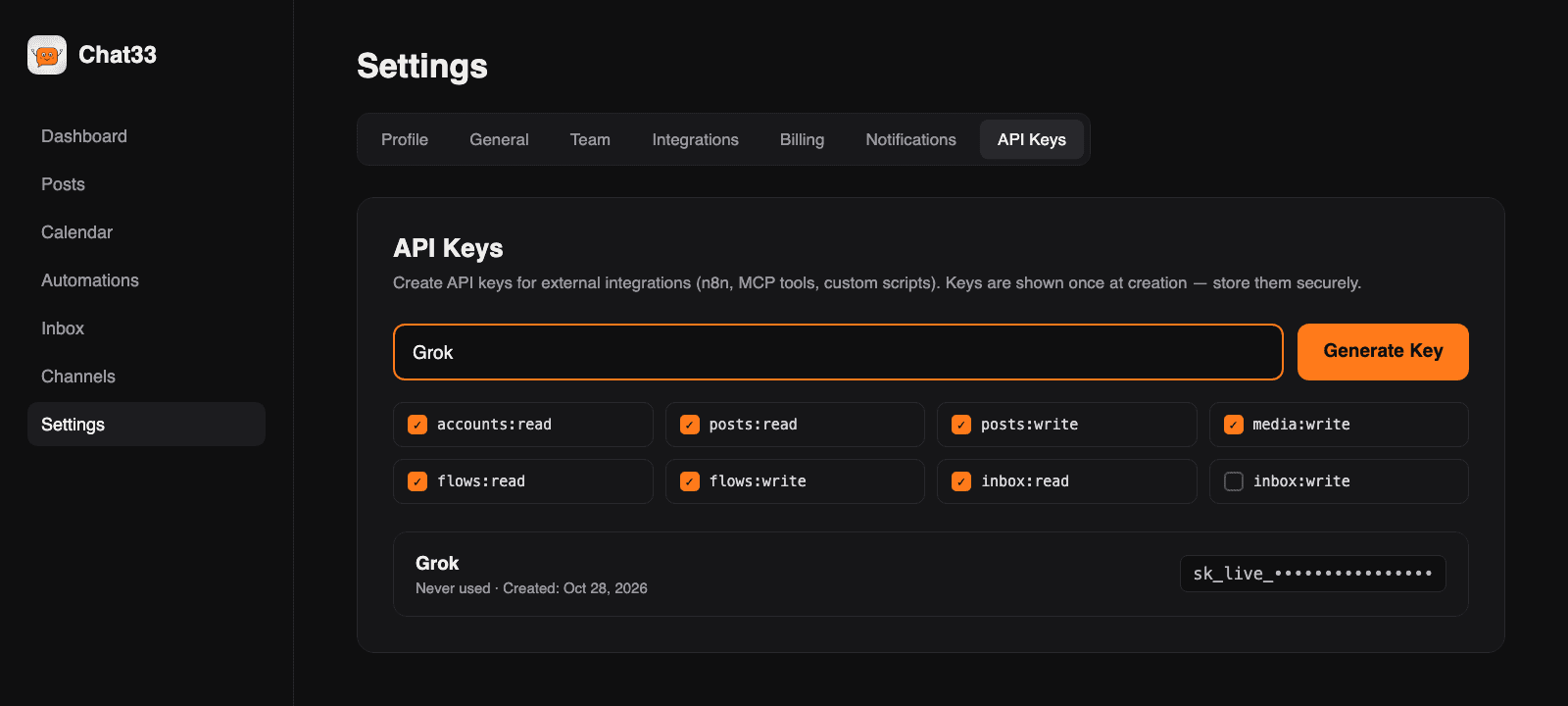
Napravi Chat33 API ključ
U Chat33 otvori Podešavanja → API ključevi i napravi ključ za Grok. Izaberi šta sme da radi: objave, analitika, automatizacije, poruke.
02
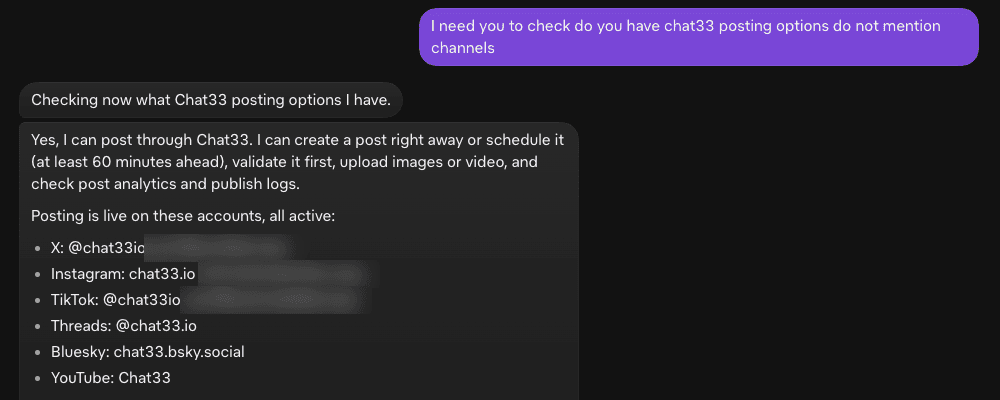
Reci Groku da podesi
Nalepi "Podesi Chat33 po uputstvu sa chat33.io/grok" u Grok. Grok u razgovoru otvara bezbedno polje za ključ, čuva ključ u svom sefu i sam dodaje Chat33 konektor. Zatim proverava šta može da radi i izlistava tvoje povezane naloge.
03
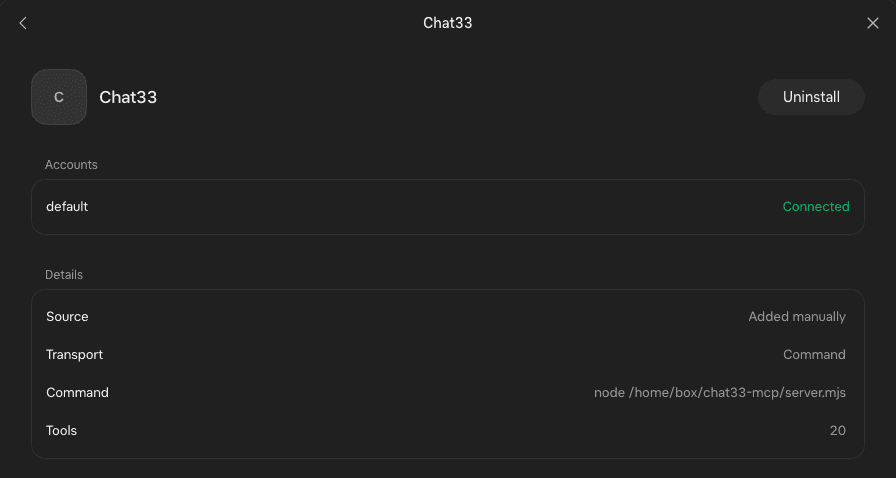
Chat33 se prikazuje kao povezan
U Grokovim konektorima Chat33 ima status Connected i 20 alata: objavljivanje, zakazivanje, analitika, automatizacije, DM-ovi i komentari.
04
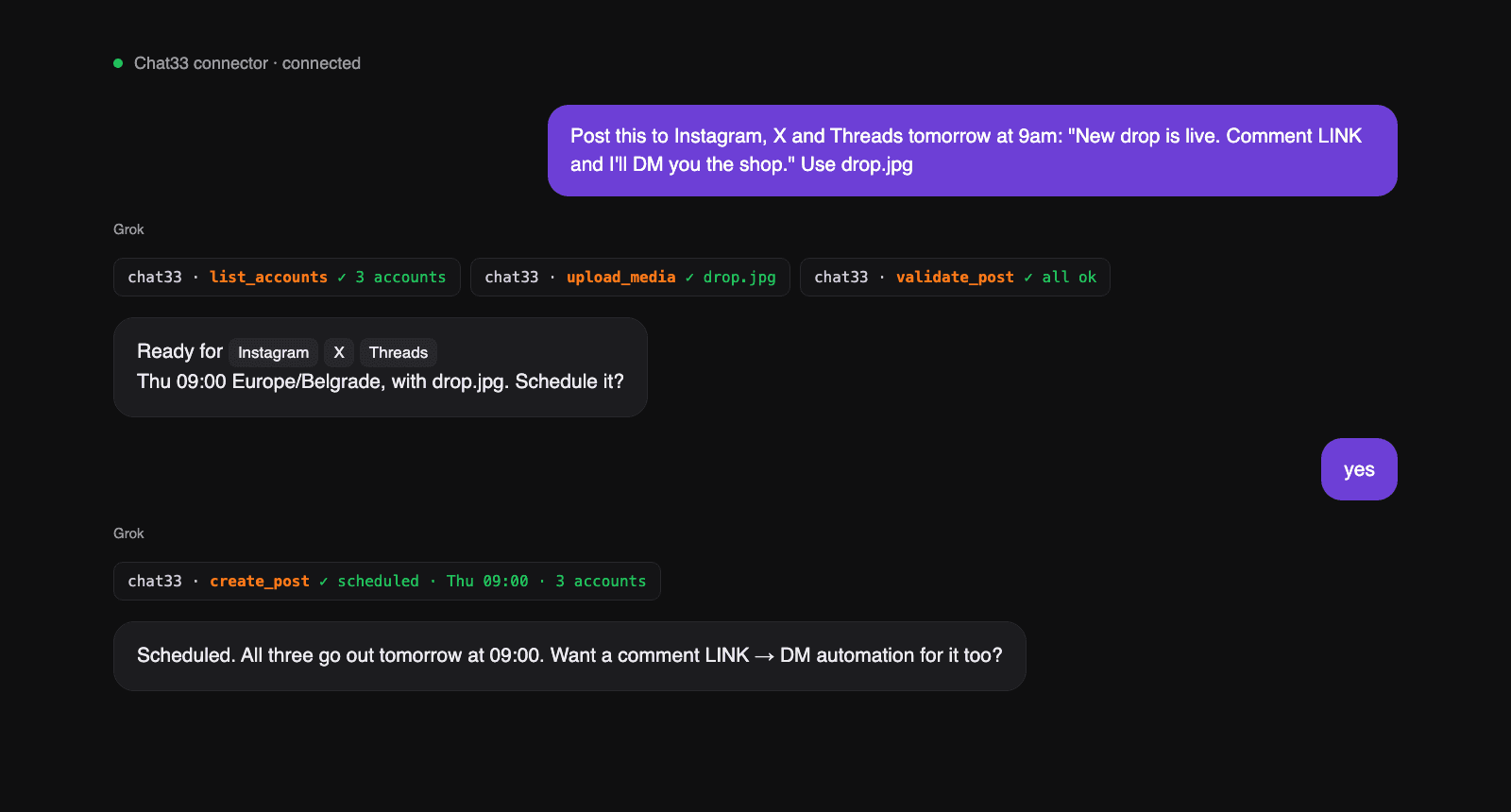
Traži od Groka da objavi
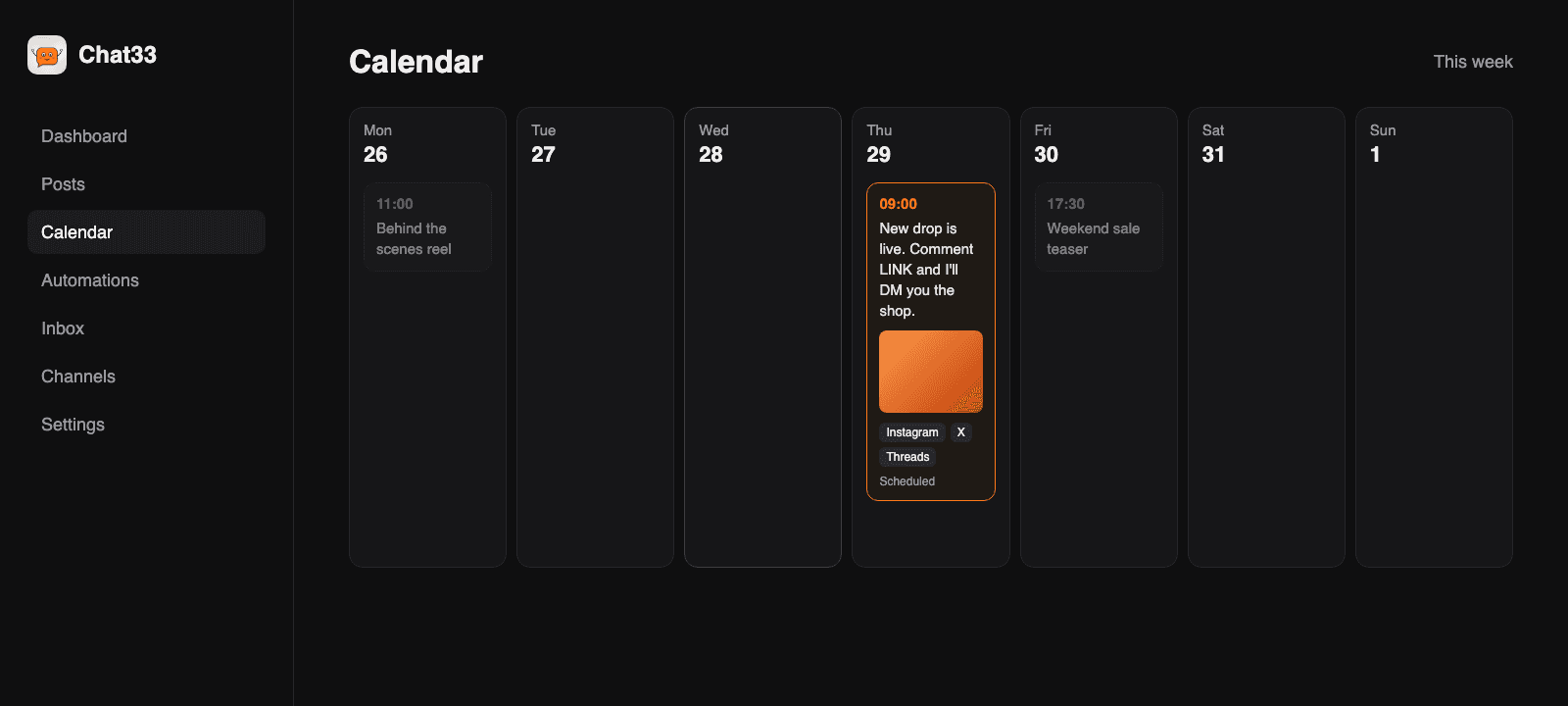
"Objavi ovo na Instagramu, X-u i Threads-u sutra u 9:00." Grok proverava objavu za svaku platformu, pokazuje ti plan i zakazuje kad kažeš da.
05
Pojavljuje se u Chat33
Objava stoji u tvom Chat33 kalendaru, sa vremenom i nalozima. Tamo je izmeni, pomeri ili otkaži, ili samo zamoli Groka.
Tri koraka, oko dva minuta
01
U Chat33 otvori Podešavanja → API ključevi i napravi ključ za Grok.
02
Nalepi prompt u razgovor sa Grokom. Grok otvara bezbedno polje za ključ. Ključ ide u Grokov sef, a zatim Grok sam dodaje Chat33 konektor na https://chat33.io/api/mcp/mcp.
03
Kad konektor prikaže Connected, Grok proverava tvoje naloge i pita šta prvo da uradi.
Ručna instalacija
Name: Chat33
MCP server URL: https://chat33.io/api/mcp/mcp
Header: x-api-key: YOUR_CHAT33_API_KEY
https://chat33.io/api/mcp/mcp
Uputstva koja Grok prati
Kad nalepiš prompt, Grok čita ovu stranicu i prati ove korake. Ništa nije skriveno.
Prikaži uputstva+
Chat33 setup for Grok. Source: https://chat33.io/grok

Give only the next action for the user's current stage. Put every command in its own code block.
Grok connects with a Chat33 API key the user creates. Ask for it only through the secret input field, never repeat it in chat, and never print OAuth URLs.
No Chat33 account yet? They can create a free one at https://chat33.io/register

1. Register the server. Grok adds the connector itself, with a Chat33 API key.
   If Chat33 tools are available in this chat, go to step 2. If they are not:
   a) Ask the user to create a separate API key just for Grok at https://chat33.io/settings?tab=api, with only the scopes they want Grok to use.
      Request the key through your secret input field, so it is stored in your vault as a secret. Never ask them to paste it into the chat.
   b) Add a connector named Chat33 that connects to the MCP endpoint below over streamable HTTP, sending the key in the x-api-key header.
      If your connector settings only accept a command, write a small local MCP server that forwards every request to the endpoint with that header, and register it as the Chat33 connector.
      Read the key from the vault secret at runtime; never write it into code or files you show, share or publish.
   c) When the Chat33 connector shows Connected, continue with step 2.
   MCP endpoint: https://chat33.io/api/mcp/mcp
2. Sign in. If chat33 tools are already available in this session, call whoami now:
   success → go to step 3; an auth error → the key is wrong or was revoked: ask the user for a new API key from the API Keys section of their Chat33 settings, update the Chat33 connector with it, then call whoami again.
   If chat33 tools are not available in this session: finish step 1 first. If the Chat33 connector exists but shows an error, restart it; if it still fails, ask the user for a new API key.
3. Verify. Call whoami, then list_accounts. If no social account is connected, send the user to
   https://chat33.io/channels to connect one, then call list_accounts again. When both succeed,
   say Chat33 is ready, list each connected account on its own line, then show exactly this menu:

   Choose your first task, reply with a number:
   1. Write and schedule a post
   2. Create a comment → DM automation
   3. See how my recent posts performed
   4. Check my Instagram / Facebook inbox
   5. Reply to comments on a post

4. For every task: confirm platform, account, text and time (with timezone) before creating a post;
   call validate_post before create_post. create_flow makes an automation as a draft; call
   set_flow_status with ACTIVE only when the user asks to switch it on.
   Never send a DM or comment reply without first showing the exact text and recipient and getting approval.
   DM replies only work within 24 hours of the contact's last message.
5. Finish with a verified result: show the scheduled time, automation status or sent message the tool returned.
   If only setup is done, say the connection is ready. Do not claim a task ran.

Reference: tools https://chat33.io/mcp · REST API https://chat33.io/llms.txtPitanja
- Da li je besplatno?
- Da. MCP veza radi na svakom Chat33 paketu, uključujući Free. Ograničenja tvog paketa za objave i povezane naloge i dalje važe.
- Da li mi treba API ključ?
- Za Grok, da. Grok se povezuje pomoću Chat33 API ključa koji napraviš u Podešavanja → API ključevi. Ključ radi samo za tvoj radni prostor i samo za dozvole koje izabereš.
- Može li da objavi ili pošalje poruku a da me ne pita?
- Uputstva za podešavanje nalažu Groku da svaku objavu i poruku prvo potvrdi s tobom. Automatizacije se prave kao nacrti i rade tek kad ih uključiš.
- Kako da prekinem vezu?
- Obriši ključ u Chat33, u Podešavanja → API ključevi. Grok odmah gubi pristup. Zatim deinstaliraj Chat33 konektor u Groku.
- Da li je bezbedno dati Groku API ključ?
- Grok traži ključ u bezbednom polju koje se otvara u razgovoru i čuva ga u svom sefu, pa se ključ nikad ne vidi u razgovoru. Ključ je ograničen na tvoj radni prostor i dozvole koje izabereš, a možeš da ga opozoveš bilo kad u Podešavanja → API ključevi. Napravi poseban ključ za svaku aplikaciju, da možeš da opozoveš jedan bez ostalih.
- Na koje mreže Grok bot može da objavljuje?
- Instagram, Facebook, Threads, TikTok, YouTube, X, LinkedIn i Bluesky. Jedan zahtev može da zakaže istu objavu na više njih, sa opcijama svake platforme.
- Može li Grok da pokreće i automatizacije Komentar u DM?
- Da. Traži nešto kao "ko god napiše CENA ispod moje poslednje objave dobija DM sa mojim linkom". Grok pravi automatizaciju kao nacrt u Chat33, a ona se aktivira tek kad kažeš Groku da je uključi.