Instagram DM automation rules: automate without getting restricted

"Will this get my account banned?" is the first question almost everyone asks about Instagram DM automation. It is the right question. Instagram does restrict accounts that message in ways it considers spam, and a restriction on a business account costs real money.
The good news is that the rules are knowable. Most of them are enforced by the API itself, so a tool built on it cannot break them even if you ask it to. The rest are habits. This article covers both.
Rule zero: use the official API
There are two kinds of Instagram automation tools.
Tools on the official Instagram API. You connect your professional account through Instagram's own login screen and approve specific permissions. The app never sees your password. Messages go through the same infrastructure Instagram built for this purpose, and the app itself has passed Meta's review to get those permissions.
Tools that act as you. They log in with your username and password, or run in a browser, and imitate a person tapping through the app. They can do things the API does not allow, like messaging strangers or following accounts in bulk. That is also exactly the behaviour Instagram looks for when it restricts accounts.
If a tool asks for your Instagram password, or promises to DM all your followers, it is the second kind. Everything below assumes the first.
The rules the API enforces
No cold messages
An app can only message someone who started the interaction: by sending you a DM, replying to your story, or commenting on your post. There is no way to send a first message to a follower who never engaged. Any "mass DM your followers" feature is outside the official API.
The 24-hour window
When someone messages you, a 24-hour window opens. Inside it, your automation can send what it likes, within reason. Every new message from them restarts the window. When it closes, standard automated messages are no longer delivered until they write again.
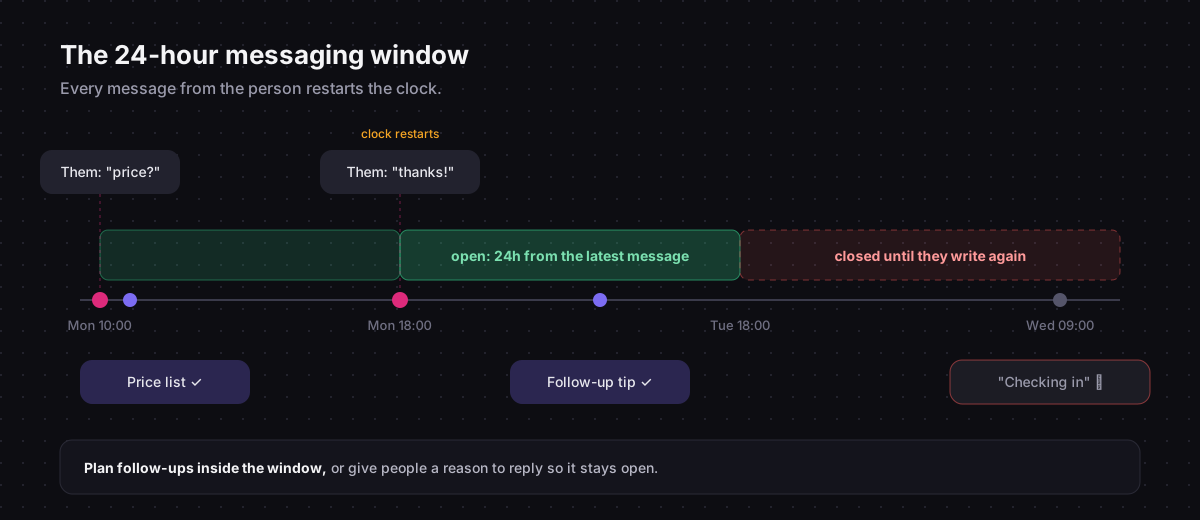
Meta also offers a human agent tag that lets a person, not an automation, reply for up to seven days. It exists for support conversations that need more time, it requires separate approval, and it is not a loophole for automated follow-ups.
What this means in practice: schedule follow-ups inside the window. A delay of a few hours after someone downloads your guide is fine. A "checking in" message three days later will not arrive.
One private reply per comment
A comment does not open the normal window. Instead, you can send exactly one private reply to it, in plain text, and it has to be sent within a few days of the comment. Further messages are not delivered until the person answers, and a flow does not pause to wait for that. That is why the link belongs in the first message of a comment flow, as the comment-to-DM guide explains.
Permissions you approved
The app can only do what you allowed when you connected. If you did not grant message access, it cannot read or send DMs. In your Instagram settings, Message controls also has an option for allowing connected tools to access messages; it needs to be on.
The rules you enforce yourself
These are not blocked by the API, but they are where restrictions come from.
Send what people asked for
A person who commented GUIDE asked for a guide. Send the guide. Sending a discount code, a newsletter signup and a survey in the same breath is how "helpful automation" turns into something people report.
Honour opt-outs
When someone says stop, stop. Chat33 has an Opt-out Automation setting per channel: with it on, a message of just STOP or UNSUBSCRIBE marks the contact as opted out before any other trigger runs, and your flows leave them alone. The words are editable.
Choose keywords carefully
A keyword that matches ordinary words sends DMs to people who asked for nothing. Matching ignores case and accents, and it requires a whole word, anywhere in the message. info does not fire on "information", and hi does not fire on "this". It does fire when that exact word appears, so garden fires on "what a lovely garden". Use specific words; the keyword guide has a table of what matches and what does not.
Do not flood comments with identical replies
A public reply under every comment is good practice. Five hundred identical replies in an hour looks like a bot, because it is one. Vary the wording, or reply publicly to a sample rather than every comment.
Pace large campaigns
A post that goes viral can generate thousands of comments in an hour, and your automation will try to answer all of them. Instagram applies rate limits to messaging apps, and hitting them repeatedly is not a good look. If you expect a big launch, it is worth staggering: one keyword per post, rather than one keyword on every post at once.
Be clear that it is automated
Some places legally require telling people when they are talking to an automated system, and even where it is not required, people take it better when they know. A short line like "Automated reply, a human will follow up if needed" costs nothing.
Why accounts actually get restricted
When an account that uses automation does get limited, the cause is usually one of these:
- A password-based tool doing actions the API does not allow.
- Reports from recipients who did not expect the message, usually because of a keyword that was too broad.
- Aggressive volume from many simultaneous campaigns.
- Content that looks like spam: links to domains people do not recognise, misleading promises, or the same pitch sent to people who asked about something else.
None of these are caused by automation as such. They are caused by automation that sends messages people did not ask for.
A quick checklist
- The tool connects through Instagram's login, not your password.
- Every flow starts from something the person did.
- The first message of a comment flow contains the link and is plain text.
- Follow-ups happen inside 24 hours of the person's last message.
- Keywords are specific, and each campaign has its own.
- Opt-out handling is on.
- Public comment replies are varied.
- Someone reads the inbox every day.
Keyword DMs, comment-to-DM and story replies on the official Instagram API, with the platform rules built into the flow editor.