Instagram DM automation for e-commerce stores

For a store, Instagram DMs are a sales channel whether you planned it or not. People see a product in a reel and ask the price. They ask if it ships to their country, whether a size runs small, when something is back in stock. Every one of those messages is someone close to buying, and every hour without an answer makes it less likely they will.
DM automation lets a small team answer those questions instantly, in the same place the customer asked them.
What stores automate first
Start with your inbox. Most stores find the same five questions make up the bulk of their DMs:
| Question | Keyword | Automated answer |
|---|---|---|
| How much is it? | price | A product carousel with prices and "Shop now" buttons |
| Do you ship to...? | shipping | Countries, delivery times, link to the policy |
| What size should I get? | size | A size chart image |
| Is it back in stock? | restock | A confirmation, and a tag so you know who asked |
| Do you have a discount? | discount | A first-order code, if you offer one |
Remember that matching finds the keyword anywhere in the message, regardless of case, but only as a whole word. "How much is the price for the blue one?" matches price. size does not fire on "oversized", and it does not fire on "sizes" either, so set up a trigger for the plural too if your customers write it.
Product carousels
A carousel is a horizontal row of cards inside the chat, each with an image, a title, a short subtitle and a button. For a store, it is the closest thing to a shop window inside a DM.
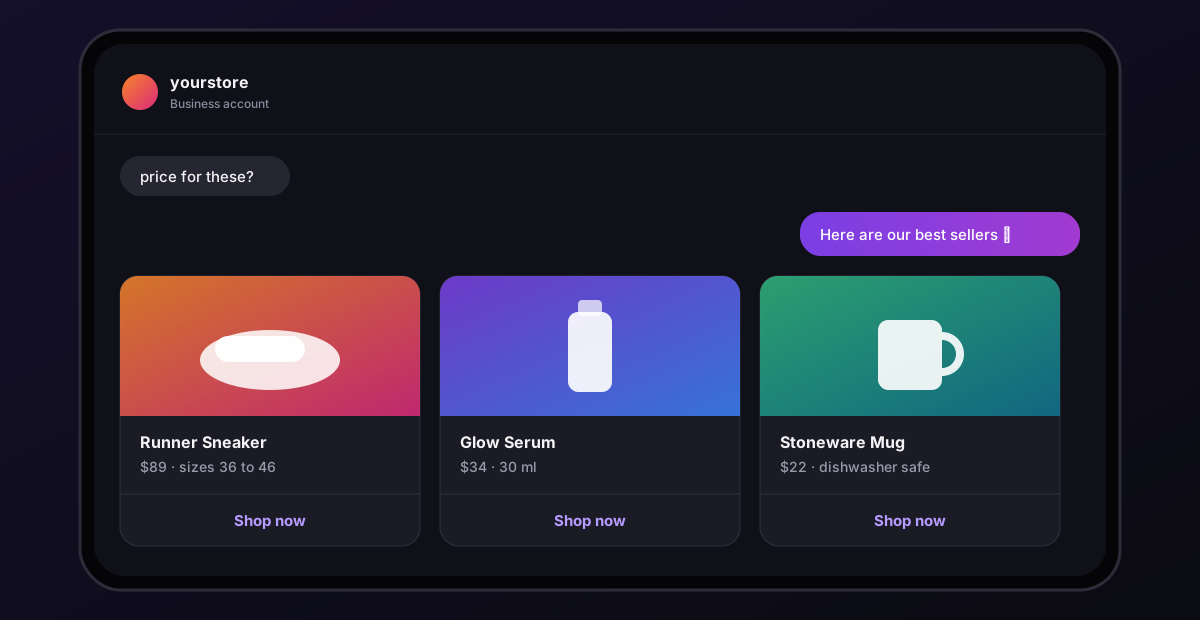
Things to know when building one in Chat33:
- Up to 10 cards per carousel.
- Titles and subtitles are short, up to 80 characters each. Put the product name in the title and the price in the subtitle.
- One link button per card. Point it at the product page, not the home page.
- Button clicks are tracked, so you can see which products people tap.
- Carousels need an open conversation. They work when someone messaged you, replied to a story, or answered your first message. As the first reply to a comment, Instagram only allows plain text.
Comment-to-DM for product posts
A product reel with "Comment SHOP for the link" (how comment-to-DM works) does two things: it gets you engagement on the post, and it gets the link into the buyer's inbox.
Because the first reply to a comment has to be plain text:
- Put the product link in the first message.
- End with a question they can answer with a word, for example "Reply CHART for the size chart."
- Build a second flow on
chartthat sends the chart image and a carousel of related products. (Notsizes: that message also containssize, so your size flow would fire too.)
Limit the comment trigger to that product's post. Otherwise every "shop?" comment anywhere gets the same link.
Discount codes without training people to wait
A discount code in the welcome message is tempting and usually a mistake: people learn that messaging you gets them money off, and your margin pays for it.
Better patterns:
- First-order code only, on a keyword you mention in specific posts.
- A code tied to a campaign, with its own keyword, retired when the campaign ends.
- A code as a thank-you after someone answers a quick question, like which product they were looking at. You learn something, they get something.
Restock requests
Stock-outs generate a lot of messages. A restock flow can:
- Confirm the request in a friendly message.
- Tag the contact, for example
restock-blue-hoodie. - Send the request to your own system through the Webhook node, including what the person typed.
Be careful with promises. Instagram only delivers automated messages within 24 hours of the person's last message, so you usually cannot DM everyone automatically when the product returns weeks later. Send a link to a back-in-stock signup form on your store, or tell people to watch your stories.
Sending leads and requests to your tools
Two nodes connect a flow to the rest of your stack:
- Webhook sends the event, the contact and the message text to a URL of your choice, for example an automation platform that adds a row to a spreadsheet or creates a ticket.
- HTTP Request calls your own endpoint; with POST or PUT it includes the same details in the body.
Both send data out. They do not bring answers back into the conversation, so an order status lookup still needs a person, or a link to your order tracking page.
Handing off to a human
Automation is good at the predictable questions. Returns, damaged items and unhappy customers need a person. Two things help:
- A default reply on the channel that says when someone will answer, and an Instagram welcome message for first-time customers.
- A
helporhumankeyword that tags the contact, so your team can find those conversations quickly.
Check the inbox every day. The automation handles volume; your team handles the conversations that decide whether someone buys again.
A starter setup for a store
priceflow with a carousel of your best sellers.shippingflow with countries and delivery times.sizeflow with your size chart image (if you sell apparel, watch for "oversized").- A comment-to-DM flow on your next product post.
- A default reply listing those keywords.
That covers most of the questions that currently sit in your inbox waiting for someone to answer.
Chat33 for e-commerceProduct carousels, keyword answers, comment-to-DM and tracked links on the official Instagram API.