Comment to DM: turning Instagram comments into conversations

"Comment GUIDE and I'll send it to you" has become one of the most common calls to action on Instagram, and for good reason. A comment is the lowest-effort thing a viewer can do. Turning it into a private conversation gives you a direct line to someone who just raised their hand.
If you are new to DM automation, start with the Instagram DM automation guide. This article explains what happens behind that exchange, the rule that decides what you can send, and how to plan a campaign so the automation does its job without looking like spam.
Why comments beat "link in bio"
A link in bio asks the viewer to do four things: stop scrolling, open your profile, find the link, and pick the right one if there are several. Every step loses people.
A comment keyword asks them to type one word. The link then arrives in their inbox, where it stays until they are ready to open it. There is a second effect too: every comment is engagement on the post, which is the signal Instagram uses to show the post to more people. The call to action and the reach work in the same direction.
What actually happens when someone comments
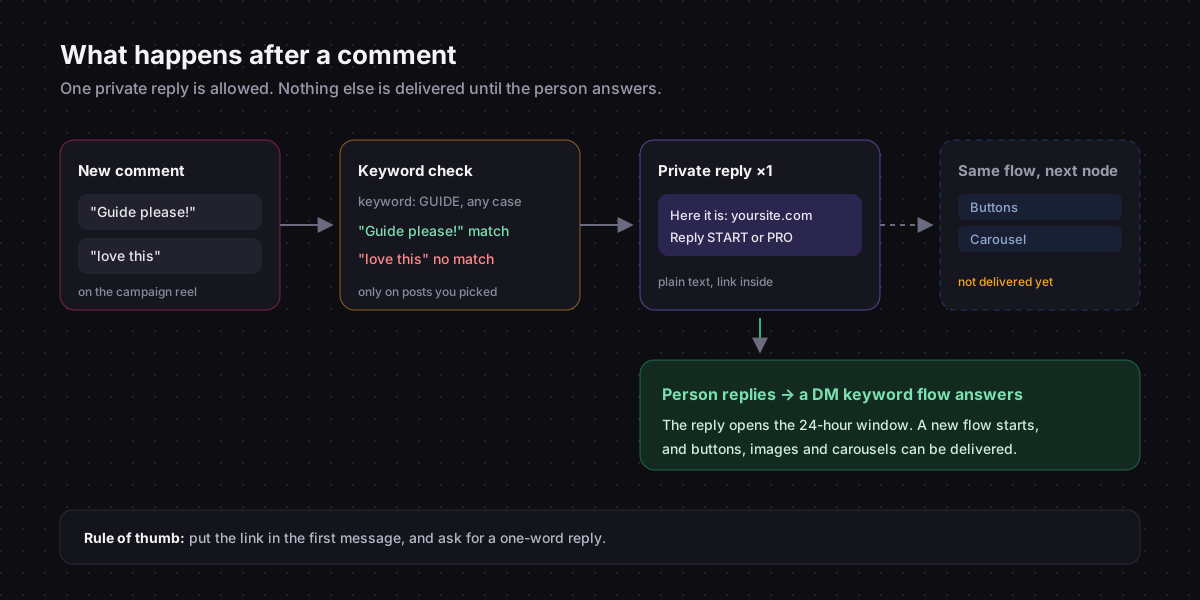
When a comment lands on your post, Instagram notifies the apps connected to your account. Chat33 checks the comment text against your comment keyword triggers. If one matches, the flow attached to it runs.
The first message of that flow is sent as a private reply. It is not an ordinary DM: it is a message tied to that specific comment, and it is the only way an app can message someone who has never written to you.
The one-message rule
Instagram allows one private reply per comment, and that reply has to be plain text. No buttons, no carousel, no image.
After that single message, the person is in your inbox but the conversation has not really started. The flow does not pause to wait for an answer: any further messages in it are sent immediately, and unless the person already had an open conversation with you, they are not delivered. When the person does reply, you are in a normal conversation and can send buttons, images and carousels for the next 24 hours after each of their messages, from a flow triggered by that reply. The Instagram 24-hour messaging window explains that window in detail, and Instagram DM automation rules covers the rest of what Meta allows.
This rule explains almost every "my automation stopped after the first message" complaint. The automation did not stop. Its later messages were sent into a conversation that was not open yet. Chat33 records those as failed deliveries in the activity feed, so you can see it happening.
Two consequences:
- The link goes in the first message. If it is in the second, most people never receive it.
- The first message should invite a reply if you want anything after it. A question works better than an instruction.
In Chat33, every comment keyword trigger shows this rule as a warning right under the keyword field, so you see it while you are building the flow, not after the campaign underperforms.
Planning a comment-to-DM campaign
Pick a keyword nobody types by accident
Matching ignores capitals and finds the keyword as a whole word anywhere in the comment. That is convenient, since "Guide please!" matches guide (while "guidebook" does not), but it also means short, common words match far too much. info, yes and link show up in ordinary comments all the time.
Good keywords are specific to the offer: CHECKLIST, PRESET, RECIPE, WAITLIST. There are 20 comment keyword examples by industry if you need ideas. If you run several campaigns at once, give each its own word. One comment only ever starts one flow, so Chat33 will not turn on a second live flow with a keyword another live flow already uses: the newer one would never run.
Limit the trigger to the right posts
A comment trigger can listen on all your posts or only on the ones you pick. Pick. A campaign reel asks people to comment the keyword; your other posts do not. Limiting the trigger means an old post where someone happens to write the word does not send a confusing DM.
If a post-specific trigger and an all-posts trigger both use the same keyword, the post-specific one wins and the other is skipped, so nobody gets a duplicate.
Write the first message
A template that works for most offers:
Here it is:
https://yoursite.com/checklistReply START if you're new to this, or PRO if you're already running it, and I'll send the right next step.
It delivers the promise in the first line and asks for a one-word answer your keyword triggers can recognise. Links in flow messages are tracked, so you will see how many people clicked.
You can personalise with {{name}}, which falls back to "there" when Instagram does not share a name.
Plan what happens after the reply
This is where the setup earns its keep. Ask for a specific word in the first message ("Reply START"), and a second flow with a DM keyword trigger on that word can:
- send a button to book a call
- send a carousel of related products
- tag the contact so you can follow up later while their window is open
- pass the lead to your CRM through a webhook
How to follow up after an automated DM has scripts for that second step.
Reply publicly, but not identically
A public "Sent, check your DMs" under the comment shows everyone else that the offer is real. Add a Reply to Comment node for it. If a campaign takes off, vary the wording; hundreds of identical replies are easy to spot. What to write as a public comment reply has examples.
Measuring it
Three numbers tell you whether a campaign works:
| Metric | What it tells you |
|---|---|
| Comments with the keyword | How well the post's call to action lands |
| Clicks on the link in the first DM | Whether the offer is what people expected |
| Replies to the first DM | Whether the follow-up has anyone to talk to |
If comments are high and clicks are low, the post over-promised. If clicks are high and replies are low, the question in the first message needs work. How to measure comment-to-DM goes deeper into these numbers.
Comment-to-DM by industry
The mechanics are the same everywhere; the offer, the keyword and the follow-up change with the business. Full setups with example keywords and messages:
- Comment-to-DM for online stores: product links from posts and stories
- Comment-to-DM for restaurants and cafés: menu, booking and opening hours
- Instagram DM automation for salons: filling free slots
- Comment-to-DM for real estate: listing details and viewings
- Comment-to-DM for coaches: free guide to booked call
- Comment-to-DM for fitness trainers: free plan to paid program
- Comment-to-DM for local service businesses: quote requests
- Comment-to-DM for B2B and service businesses: lead magnets for longer sales
- Comment-to-DM for agencies: selling it as a service to clients
- Course launch waitlist on Instagram: building a waitlist in the comments
The same setup works on a Facebook Page, where the reply arrives in Messenger: see Facebook Messenger marketing automation.
Common mistakes
- Buttons in the first message. They cannot be sent as buttons. Chat33 turns link buttons into plain links in the text and drops reply buttons, so write the first message as text from the start.
- Messages after the first one in the same comment flow. They are not delivered unless the conversation was already open. Put follow-ups in a DM keyword flow.
- A keyword that is also a common word. Every "info?" under every post fires the flow.
- No public reply. Viewers cannot tell whether the offer works, so fewer comment.
- One campaign keyword reused forever. Old posts keep firing a flow whose content is out of date. Retire keywords when campaigns end.
Keyword triggers per post, private replies on the official Instagram API, link tracking and public comment replies in one flow.