The Instagram 24-hour messaging window, explained
If you automate Instagram DMs for long enough, you will hit this: a follow-up message that looked fine in the flow editor never reaches anyone. The flow ran. The message was not delivered. The reason is almost always the 24-hour messaging window.
It is the single most important rule in Instagram messaging automation, and once you plan around it, most "my automation is broken" moments disappear.
What the window is
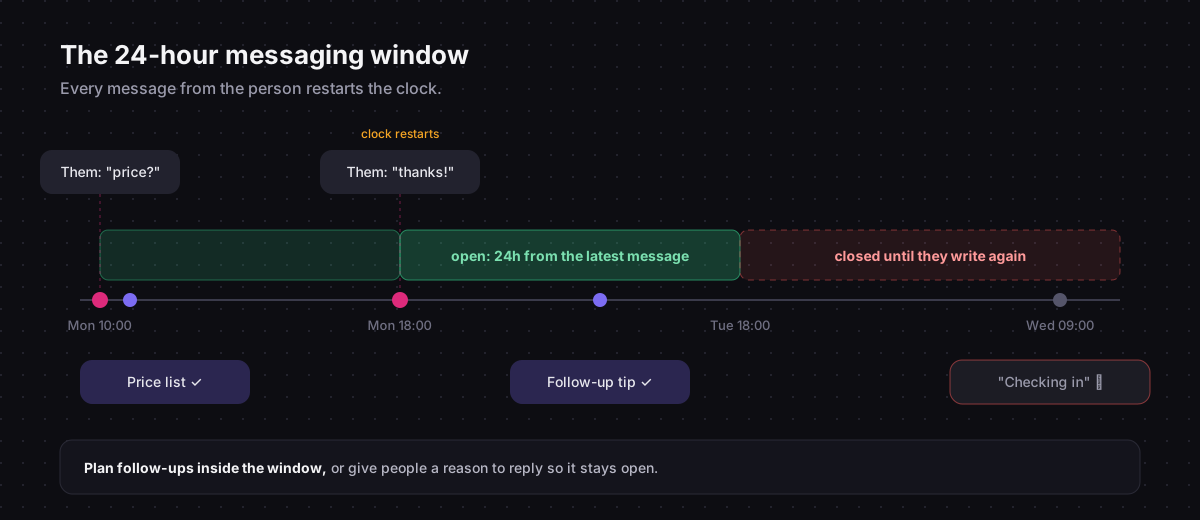
When someone sends a message to your professional account, Instagram opens a 24-hour window for that conversation. Inside the window, an app connected to your account can send them messages: text, images, buttons, quick replies, carousels.
When 24 hours pass without a new message from them, the window closes. Automated messages are no longer delivered until the person writes again.
It exists to stop businesses from messaging people indefinitely after a single interaction. Think of it as the platform asking: is this person still in a conversation with you?
What opens and resets it
The window is tied to the other person's activity, not yours.
| Their action | Effect on the window |
|---|---|
| Sends you a DM | Opens it, or restarts the 24 hours |
| Replies to your story | Opens it, or restarts the 24 hours |
| Taps a quick reply or a button you sent | Counts as a message from them, restarts it |
| Comments on your post | Does not open it. Allows one private reply instead |
| Likes or saves your post | Nothing |
| Follows you | Nothing |
Your own messages never extend the window. Sending three messages in a row does not buy you more time.
Comments are a special case
A comment is public and was not addressed to you directly, so it gets different treatment. You can send exactly one private reply to a comment, it has to be plain text, and further messages are not delivered unless the person already had an open conversation with you. When they answer the private reply, the normal 24-hour window opens.
That is why comment flows put the link in the first message and end with a reason to reply. How comment-to-DM automation works goes through it step by step.
What happens when a message falls outside the window
The platform rejects it. The flow does not crash, but nothing reaches the person. Chat33 records these as failed deliveries in the activity feed, so you can spot them.
This is easy to miss, because everything looks right in the editor. The usual culprits:
- A long Delay node. A flow that waits two days before a follow-up will try to send after the window has closed.
- A second message in a comment flow. It is sent right after the private reply, before the person could possibly have answered.
- An old contact. Someone who last messaged you a week ago is outside the window, no matter which flow you run.
Planning follow-ups that arrive
Keep delays inside the day. A Delay node of a few minutes or a few hours is fine. If you want to send something the next day, it will only arrive if the person has written again since.
Earn the next message. End messages with something worth answering: a question, a choice between two options, or quick replies. Every answer restarts the clock.
Use quick replies generously. A tap counts as a message from the person. A flow that asks "Want the advanced version? Yes / No" keeps the window open for everyone who taps.
Move long-term follow-up elsewhere. If you need to reach people next week, send a link to an email signup page, or ask for a follow. The DM is for the conversation that is happening now.
What about human replies?
The window applies to automated and human messages alike. Meta offers a separate human agent tag that lets a real person reply up to seven days after the customer's last message. It is meant for support conversations that cannot be resolved in a day, it requires separate approval for the app, and it cannot be used for automated messages or promotions.
In practice: answer your inbox daily, and most conversations never get near the limit.
Facebook Pages follow the same 24-hour rule in Messenger. Facebook Messenger marketing automation covers the Page side.
Quick reference
- The window is 24 hours from their latest message.
- DMs, story replies and taps on your buttons or quick replies reset it.
- Comments allow one plain-text private reply, and open the window only once the person answers.
- Your own messages do not extend it.
- Messages outside the window are not delivered.
- Keep delays short and give people reasons to reply.
For the rest of the rules that keep an automated account in good standing, read Instagram DM automation rules.
Instagram DM automation in Chat33Keyword DMs, comment-to-DM, story replies and quick replies on the official Instagram API.