Instagram quick replies, buttons and carousels in DMs
A plain text reply asks the person to type. An interactive message lets them tap. On a phone, that difference is huge: tapping is effortless, and a tapped answer is one your automation understands exactly, with no typos and no guessing.
Instagram DMs support three interactive formats. Here is what each one does and when to use it.
Quick replies vs saved replies
"Quick replies" means two different things on Instagram, and it is worth sorting out first.
- Saved replies are a typing shortcut for you. In the Instagram app on a professional account, you save a message under a short word such as
hours, then type that word in any chat to fill in the full text. Some guides and older app versions call these quick replies. A person still has to open the chat and send it. - Quick reply buttons are tappable chips that an automated message offers the other person, sent through Meta's messaging API. Your follower taps one instead of typing, and your automation answers.
Saved replies make you faster at answering by hand. Quick reply buttons let the conversation move without you. The rest of this article is about the second kind.
Quick replies
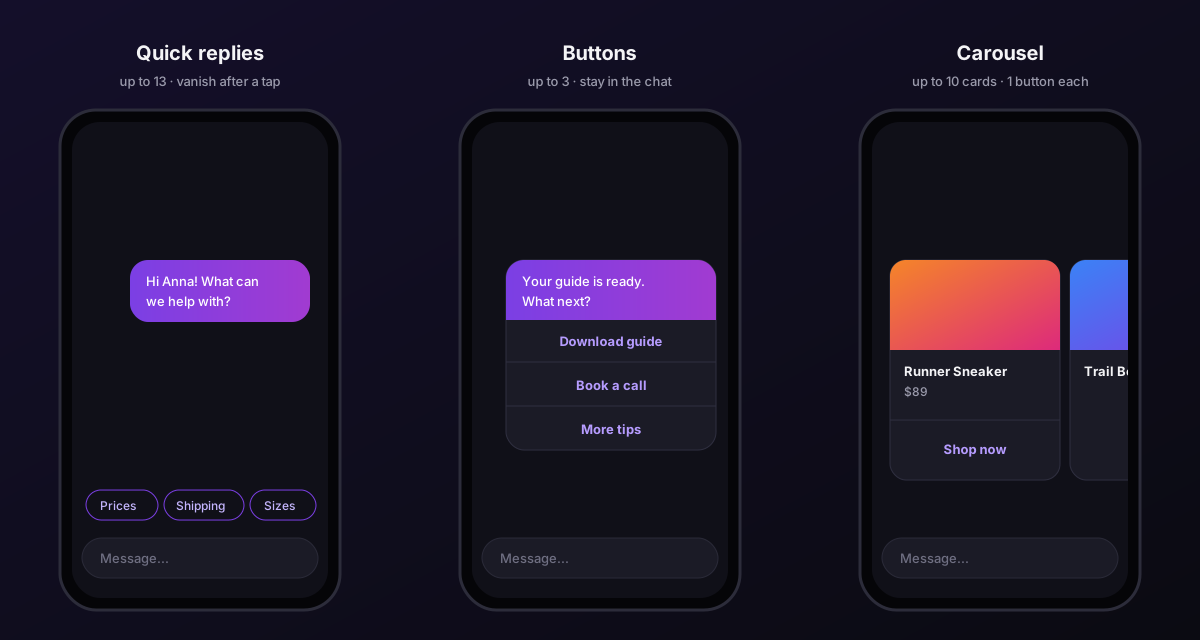
Quick replies are small chips that appear above the keyboard under your message. The person taps one, and its label is sent back as their reply.
- Up to 13 options per message.
- Short labels read best; keep them to a word or two.
- They disappear once the person taps one or types something else.
Use them for choices: "What are you looking for?" with Prices, Shipping, Sizes. Or a yes/no question to keep the conversation going.
How a tap connects to your flows
A tapped quick reply arrives exactly like a message containing its label. That means your keyword triggers see it. Label a quick reply "Price" and your price keyword flow answers it.
This is the cleanest way to build a menu: one message with quick replies, and one keyword flow per option. Check your labels against your keywords: keywords match whole words, ignoring case and accents, so a price keyword matches "Price" and "What's the PRICE?" but not "Prices". Either label the option with the exact word, or add the plural as a second keyword.
Quick reply message examples
Each example is the message text plus the options shown as chips.
- Store menu: "Hi
{{name}}! What are you looking for?" with Prices · Shipping · Sizes - Order help: "Happy to help with your order. What's going on?" with Track order · Return · Something else
- Booking: "Want to book a visit? Pick what suits you." with This week · Next week · See prices
- Lead magnet: "Want the free guide sent here?" with Yes please · Not now
- Qualifying a lead: "Quick question so we send the right info: what describes you best?" with Just starting · Growing · Agency
- Handover: "Did that answer your question?" with Yes, thanks · Talk to a person
Make sure each label you want answered automatically contains one of your keywords as a whole word. "Talk to a person", for example, should match a keyword flow such as person that tags the conversation for your team.
Buttons
Buttons sit inside a card attached to your message and stay visible in the conversation.
- Up to 3 buttons per message.
- Link buttons open a URL. Clicks are tracked, so you can see how many people tapped.
- Reply buttons send a value back into the conversation, which your keyword triggers can match, just like a quick reply.
Use them for actions: Shop now, Book a call, Download the guide. A button looks more deliberate than a link pasted into text, and it does not show a long URL.
Carousels
A carousel is a horizontal row of cards, each with an image, a title, a subtitle and a button.
- Up to 10 cards.
- Title and subtitle up to 80 characters each.
- One link button per card, with a short label.
Use them for browsing: products, services, articles, class times. Our e-commerce guide has a full product example.
When you cannot use them
Interactive messages need an open conversation. They work when the person has messaged you, replied to your story, or tapped something you sent within the last 24 hours.
Replies to comments are the special case. After a comment, Meta allows a single private reply to that person until they write back, and what it accepts in that reply is limited:
- Instagram connected through Instagram Login: Chat33 first tries to send quick replies or buttons as real taps. If Meta refuses, it falls back to plain text, with link buttons written out as links.
- Instagram connected through a Facebook Page: the first reply goes out as plain text. Link buttons become links in the text, quick reply options are written out as text, and reply buttons are dropped.
- Carousels are always sent as plain text lines (title and link) in that first reply.
The safe pattern: put the link in the text of the first message, ask for a one-word reply, and use carousels and buttons in the flow that answers it. The comment-to-DM guide covers the rest.
Choosing the right format
| You want the person to... | Use |
|---|---|
| Pick one of a few options | Quick replies |
| Answer yes or no | Quick replies |
| Open a link | A link button |
| Choose between two or three actions | Buttons |
| Browse several items | A carousel |
| Get a link after commenting | A message with the link in the text |
Writing good labels
- Start with a verb for actions: "Book a call", "See sizes".
- Use nouns for choices: "Prices", "Shipping", "Returns".
- Keep them short. Long labels get cut off on small screens.
- Make them distinct. "Info" and "More info" side by side confuse people and keyword triggers alike.
- Avoid emoji-only labels if a keyword needs to match them.
A menu flow you can copy
- Trigger: welcome flow for new contacts, or a
menukeyword. - Quick Replies: "Hi
{{name}}! What can we help with?" with Prices, Shipping, Talk to us. - Keyword flow
prices: a carousel of your best sellers. - Keyword flow
shipping: a text message with delivery times and a link button to the full policy. - Keyword flow
talk: a short message saying a person will reply, plus a tag so your team can find the conversation.
Every path starts with a tap, so every path is predictable.
Instagram DM automation in Chat33Quick replies, buttons, carousels and keyword triggers on the official Instagram API.