Instagram DM automation: a practical guide
Most Instagram accounts that sell anything get the same five questions in their DMs every day. What does it cost, where is the link, do you ship to my country, is this still available, can I get the freebie you mentioned. Answering each one by hand works until it doesn't, usually right after a post does better than expected.
DM automation is the fix, but only if it is set up the way Instagram expects. This guide covers what you can automate, what the platform does not allow, and how to build a first flow that you can trust to run on its own.
What Instagram DM automation actually is
An automation is a rule with two halves: something that happens on your account, and the messages that go out because of it. In Chat33 that rule is called a flow. The first node is the trigger, and everything connected after it runs when the trigger fires.
The part that matters is where it runs. Automation built on the official Instagram API is invited in by Instagram: you connect a professional account, Instagram asks you to approve specific permissions, and messages are delivered through the same system Instagram gives to any approved app. Tools that log in as you and click through the app are a different category, and they are the reason "Instagram automation" has a bad reputation. Everything below assumes the official route.
What you can automate
Four triggers cover almost every real use case.
- Someone sends a DM containing a keyword. A person writes "price" and gets your price list. Matching is not case sensitive, and the keyword can appear anywhere in the message, so "what's the PRICE?" matches too.
- Someone comments a keyword on your post. The classic "comment LINK and I'll send it to you". The person gets a private DM in reply to their comment.
- Someone replies to your story with a keyword. Useful for story-only offers, where the story itself tells people what to reply.
- Someone sends a message nothing else matches. A default reply on the channel, so nobody is left on read while you are asleep.
After the trigger, a flow can send text, images, buttons, quick replies and product carousels, wait for a set time, branch on a condition, tag the contact for later, split traffic between two versions, or send the data to your own system through a webhook.
What Instagram does not allow
These are platform rules, not tool limitations. Any honest automation product works inside them.
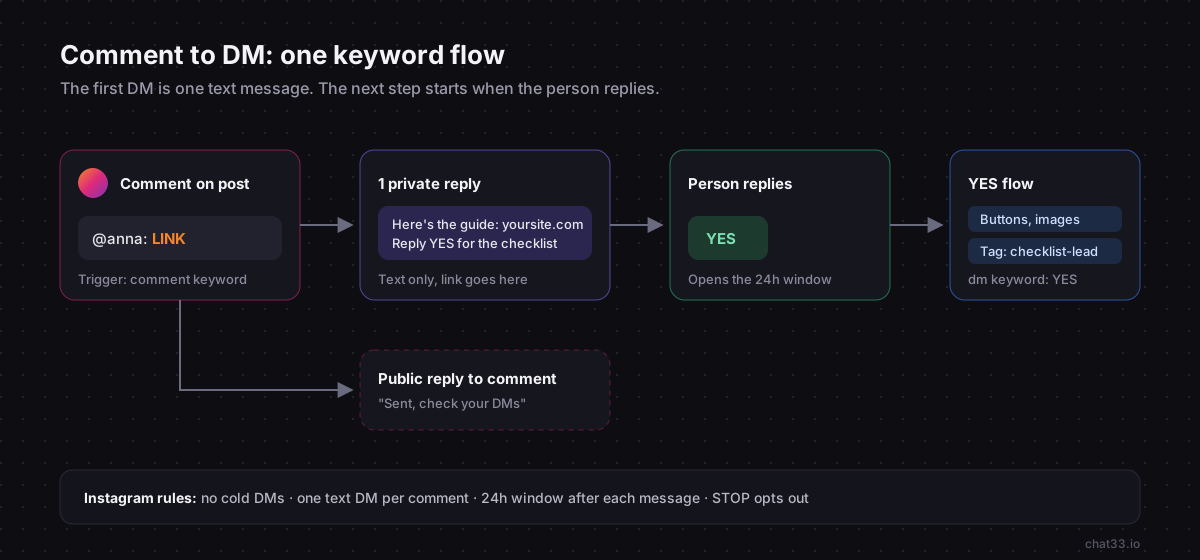
You cannot message people who never messaged you
There is no cold outreach through the API. A conversation has to start with the other person: a DM, a story reply, or a comment on your post. If a tool promises to DM everyone who follows you, it is not using the official API.
The 24-hour window
Once someone messages you, you have 24 hours from their latest message to reply freely. Every new message from them resets the clock. After the window closes, automated messages stop being delivered until they write again. Plan follow-ups inside that window, or give people a reason to reply so it stays open.
One DM per comment, and it has to be text
A comment is not a conversation yet. Instagram lets you send exactly one private reply to a comment, and that first message has to be plain text, without buttons. A flow does not pause and wait for an answer: any further messages in the same flow are sent right away, and they only arrive if the person already has an open conversation with you. Otherwise they are not delivered. The conversation continues when the person replies to that first message, and a separate DM keyword flow picks it up from there. Chat33 shows this as a warning on every comment trigger, because it is the most common reason a comment flow "stops working" after the first message.
The practical rule: put the link in the first message, and end it with a question if you want the conversation to continue.
If your comment flow sends a text message and then a set of buttons, the buttons usually never arrive, because the conversation is not open yet. That is Instagram's rule, not a bug. Design the first message so it stands on its own, and put the next step in a flow that runs when the person replies.
People can opt out
Anyone who replies STOP or UNSUBSCRIBE should stop getting automated messages. Turn on Opt-out Automation for the channel in Chat33 and a message consisting of just one of those words marks the contact as opted out, before any of your own triggers run. START or SUBSCRIBE works the same way under Opt-in Automation. You can change the words per channel.
Before you start
You need three things.
- An Instagram professional account. Business or creator both work. Personal accounts have no messaging API.
- Message access for connected tools turned on. In the Instagram app, open Settings, then Messages and story replies, then Message controls, and allow access to messages under connected tools.
- A Chat33 account with the Instagram channel connected. Connecting takes you through Instagram's own login screen, where you approve the permissions. Nothing is stored about your password.
Build your first flow: "comment LINK, get the link"
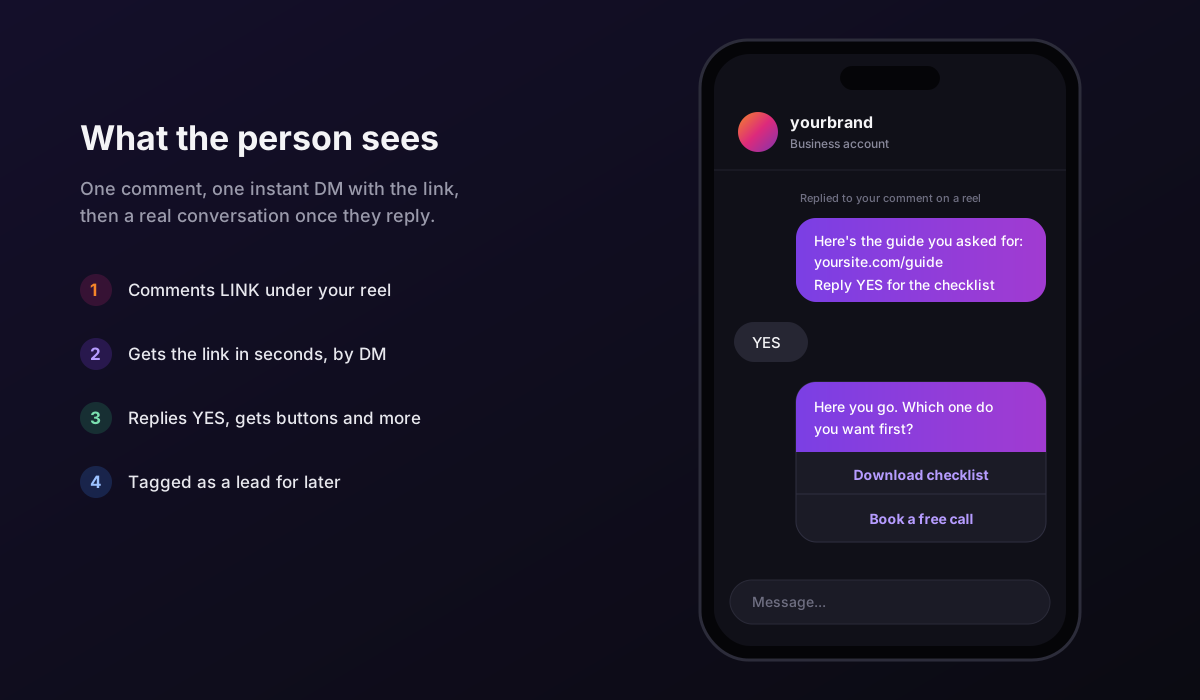
This is the flow most accounts start with, and it teaches every rule above. Here is what it looks like from the other side of the screen once it is running.
1. Create the flow
Open Flows and create a new flow. Give it a name you will recognise in a month, like "Reel 12 LINK giveaway". The canvas starts with a Trigger node.
2. Configure the trigger
Click the Trigger node and pick comment keyword. Set the keyword to LINK.
Below the keyword you can pick specific posts. Do it. A flow that listens on every post will also fire when someone writes "link in bio?" under an unrelated photo. A flow tied to one post only fires where you asked people to comment.
If another flow already uses the same keyword, the editor warns you. Two flows answering the same word means two DMs, which reads as spam.
3. Write the first message
Add a Send Message node and connect it to the trigger. Remember the rules: text only, and this may be the only message the person ever gets.
A message that works:
Here's the guide you asked for:
https://yoursite.com/guideWant the checklist version too? Reply YES and I'll send it.
It delivers the promise immediately, and the question gives the person a reason to reply, which opens the 24-hour window for everything else.
4. Continue the conversation
Now create a second flow with a dm keyword trigger on YES that sends the checklist. Because the person wrote to you, you can now use buttons, images and carousels.
This is also the place for a Tag User node. Tag everyone who replied YES as checklist-lead. A tag costs nothing now and lets you send that group something relevant later, while their window is open.
5. Reply to the comment publicly
Add a Reply to Comment node with something short, like "Sent, check your DMs". It tells other people scrolling the comments that the offer is real, which is usually what gets the next hundred comments.
Vary the wording if you can. Hundreds of identical public replies look automated, because they are.
6. Turn it on and test it from another account
Activate the flow, then comment LINK on the post from a second Instagram account. Not your own: messages from the account to itself are not a real test. Check three things: the DM arrived, the public reply appeared, and replying YES sends the checklist.
Mistakes that break flows
- Keywords that are too common. "hi" or "info" as a comment keyword matches half your comments. Use a word nobody types by accident.
- Listening on all posts. Tie comment flows to the posts that ask for the keyword.
- Burying the link. If the link is in the third message of a comment flow, most people never see it, because only the first message is guaranteed to arrive.
- No default reply. Set one on the channel in Channels, so messages that match nothing still get an answer that points people somewhere useful. Instagram welcome message examples cover how to write it.
- Never reading the inbox. Automation handles the repeat questions. The unusual ones still need a person, and they are usually the valuable ones.
Where to go from here
Once the first flow works, the same pattern extends to story replies, product questions and lead capture. The next steps worth reading are how comment-to-DM campaigns are structured, how to choose keywords that only fire when they should, which automation habits keep an account in good standing, and Instagram quick replies and buttons for the conversation after the first reply.
Instagram automation in Chat33Keyword DMs, comment-to-DM, story replies and a shared inbox, all on the official Instagram API. Free plan available.