Automating replies to Instagram story replies
Stories are where your most engaged followers spend time. They are also the easiest place to ask for a reply: the message field is right there at the bottom of the screen. A story that says "Reply PLAN and I'll send you the template" turns a 24-hour post into a list of people who want something from you.
Story reply automation is what makes that scale past the first dozen replies.
How a story reply trigger works
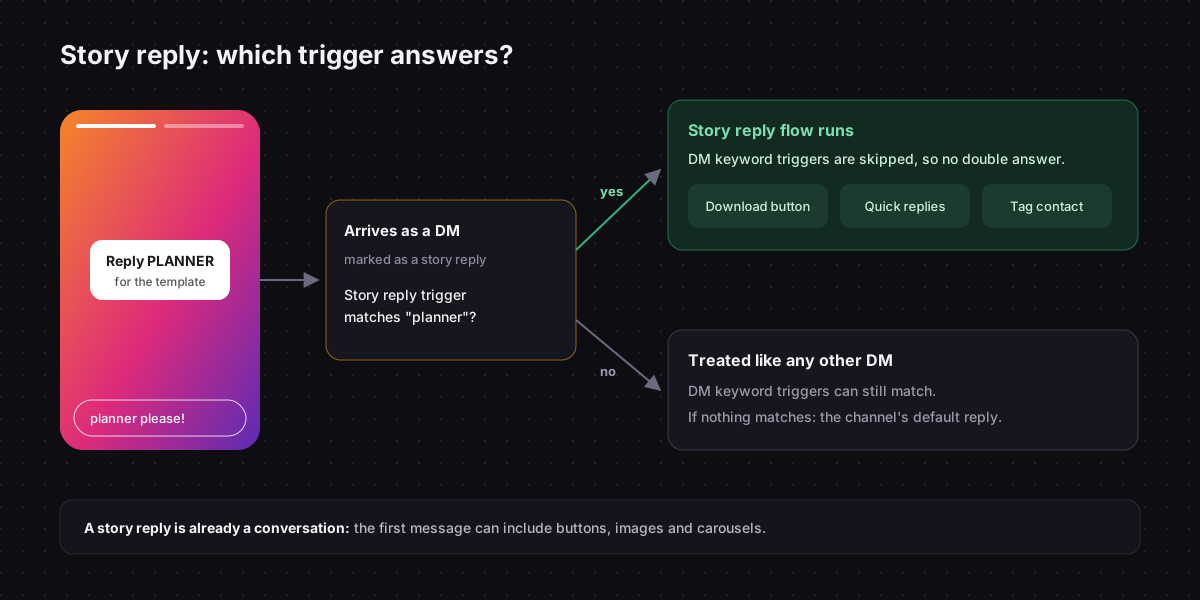
When someone replies to one of your stories, Instagram delivers it as a direct message, marked as a reply to that story. A story reply trigger in Chat33 checks those messages for a keyword and runs its flow when it matches.
Three details matter:
- It needs a keyword. A story reply trigger without one never fires. This is deliberate: stories get a lot of casual replies ("love this!", a fire emoji) that should reach you, not an automation.
- It only fires on story replies. A normal DM with the same word does not trigger it.
- It takes priority over DM keywords. If a story reply matches a story reply trigger, your DM keyword triggers are skipped for that message, so nobody gets two answers. If it matches no story reply trigger, your DM keyword triggers still get a chance.
Matching works like everywhere else: case does not matter, and the keyword can appear anywhere in the reply. The keyword guide covers how to pick one.
Why story replies are better than comments for some offers
A story reply is a DM from the start. That changes what you can send.
A comment only allows one plain-text private reply, and nothing else is delivered until the person answers (why comment-to-DM works this way). A story reply opens the regular 24-hour conversation window immediately, so the first automated message can already include buttons, quick replies, an image or a product carousel.
| Comment keyword | Story reply keyword | |
|---|---|---|
| Visible to others | Yes, adds public engagement | No, private |
| First message | One plain-text reply | Anything: buttons, images, carousels |
| Lifespan | As long as the post is up | 24 hours, unless in a highlight |
| Best for | Reach and social proof | Direct response from warm followers |
Stories disappear after a day, but the trigger does not. It is not tied to one story, so a keyword you use every week keeps working, and a story saved to a highlight keeps collecting replies.
Five story campaigns to copy
1. The template drop
Story: a screenshot of a template or checklist, "Reply TEMPLATE and it's yours." Flow: a message with a download button, then a quick-reply question about what they are working on.
2. The poll follow-up
Story: a question sticker or poll about a problem, then a second story, "Reply FIX for my 3-step fix." Flow: the three steps as a short carousel, each card linking to more detail.
3. The restock alert
Story: a sold-out product, "Reply NOTIFY to hear first."
Flow: a confirmation message, and a Tag User node that tags the contact notify-product-name, so you know exactly who asked when stock returns.
4. The booking push
Story: a few open slots this week, "Reply SLOT to grab one." Flow: quick replies with the available days, then a booking link for the chosen day.
5. The behind-the-scenes link
Story: part of a longer video, "Reply FULL for the whole thing." Flow: the link, plus a question that invites a reply so the conversation stays open for your next message.
Writing the story itself
- Show the keyword big. Use a text sticker, not the caption. People reply to what they can read at a glance.
- Say what they get. "Reply PLAN for my weekly content planner" beats "Reply PLAN."
- Pick a word that is hard to type by accident. Casual replies like "wow plan looks great" will match
plantoo.PLANNERis safer. - Add it to a highlight if the offer is evergreen, so new followers can find it.
Handling everything else
Most story replies will not contain your keyword. People react with emoji, compliment the post, or ask something unrelated. Those messages go to your inbox, and if you have set a default reply on the channel, they get that.
Think about whether that default reply fits a story reaction. "Thanks for the message, we reply within a few hours" is fine. A sales pitch in response to a heart emoji is not.
Story reply automation in Chat33Story reply keywords, DM keywords and comment-to-DM in one flow builder, on the official Instagram API.