Comment-to-DM for online stores: sell from posts and stories
A "link?" comment under a product photo is about the warmest signal an online store gets. The person has seen the item, wants it, and is asking how to buy it. Then the usual path kicks in: open your profile, tap the bio link, land on the homepage, find the menu, guess the category, scroll. Somewhere along the way, a notification pulls them elsewhere and the sale is gone.
Comment-to-DM shortens that path to a single step. They comment a keyword, and a DM with the exact product page arrives in their inbox seconds later. Here is how to set that up for a store, with keywords for each job, a complete flow you can copy, stories, and launches.
In short:
- Product questions in comments come from people who are close to buying.
- A keyword DM sends them straight to the right product page, not your homepage.
- Give each keyword one job and keep its meaning the same on every post.
- For launches, collect interest with one keyword and sell with another.
- Order problems, returns and complaints go to a person.
One keyword per job
Pick a small set of words and use them consistently. After a few posts, your followers learn what each one does and comment without rereading the caption.
| Keyword | Job | Best for |
|---|---|---|
LINK | Sends the product page | Single-product posts |
SIZES | Stock and variants, plus the link | Clothing and shoes |
PRICE | Price and the link | Audiences who ask "how much?" first |
DROP | Launch date and collection page | New collections |
RESTOCK | Back-in-stock link | Items people kept asking about |
GIFTS | Your gift guide | Holidays and occasions |
One caution on wording: keyword matching checks whether a comment contains the word. SIZE also matches "oversized", which is a real word under fashion posts, so SIZES is the safer choice. Limiting each trigger to the posts that ask for it helps too. For more words by industry, see comment keyword examples by industry.
Copy-paste setup: a product post
A small homeware brand posting a new linen throw blanket:
- Caption, first line: "The washed linen throw is here in four colours. Comment SIZES and I'll DM you what's in stock."
- Trigger: comment keyword
SIZES, on this post only - First DM:
Hey {{first_name}}, the linen throw comes in two sizes, 130x170 and 150x200, in clay, sage, oat and charcoal.
Here it is: https://yourstore.com/linen-throw
Is it for a sofa or for the bed?
- Public reply variants:
Sent, check your DMs,{{username}} the sizes are in your inbox,Just sent you the details,In your DMs now - Tag:
sizes-linen-throw
The question at the end is not decoration. If the person replies "sofa", a normal conversation opens, and someone from your team can help them pick a colour. That's often how a comment becomes an order. On Instagram comment DMs, {{first_name}} reads "there", because Instagram only shares the commenter's handle, so the greeting is "Hey there".
For what the DM itself should say, the 2-part sales DM has templates for price, sizes and links.
The first DM after a comment is the only message that arrives until the person replies. A flow doesn't wait for their answer: anything you add after the first message is sent right away and only arrives if they already had an open conversation with you. So put the product link in that first DM, not in a second one.
Stories sell the everyday things
Stories are where many stores show what's new today: an arrival, a restock, packing orders. Replying to a story takes one tap and one word, which makes stories a natural place for a keyword.
Add a line such as "Reply LINK and I'll send it to you". A story reply trigger sends the same kind of DM a comment would. Good uses:
- Restocks: "The ceramic mugs are back. Reply RESTOCK for the link."
- Small daily offers: "Free gift wrap on orders today. Reply GIFTS for the guide."
- Polls that lead somewhere: show two colours, then "Reply LINK for the one you liked."
And for people who skip comments and stories and simply DM you "link?", a DM keyword trigger answers them the same way.
Running a launch with two keywords
Launches are where comment-to-DM earns its keep, because interest builds before there is anything to buy.
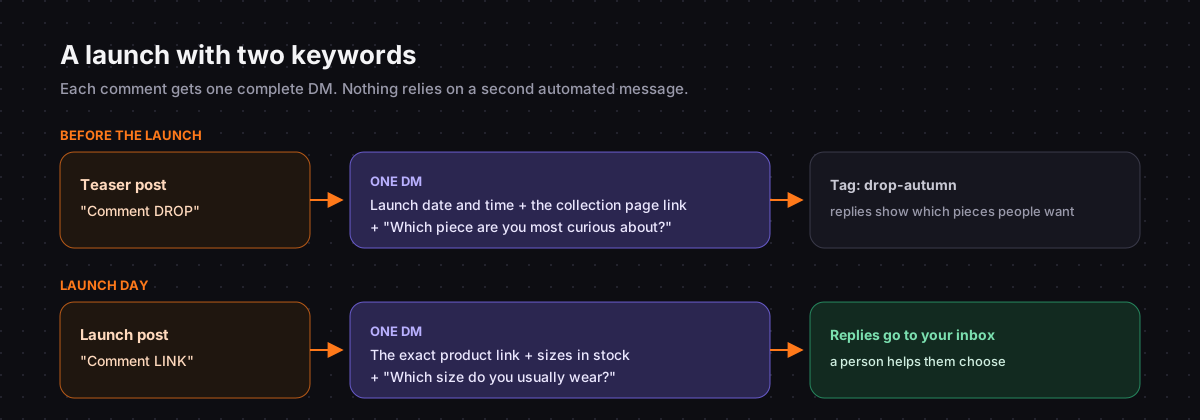
Before the launch. Post a teaser: "The autumn collection lands Friday at 10:00. Comment DROP and I'll send you the page." The DM gives the date, the time and the collection page link right away, which can show a "coming soon" page until then, and asks one question:
You're in, {{first_name}}. The autumn collection goes live Friday at 10:00, right here: https://yourstore.com/autumn
Save the link. Which piece are you most curious about?
Tag everyone drop-autumn. Their answers tell you which pieces people want before you've sold anything.
On launch day. Post again with LINK or SIZES as the keyword, so people get the exact product page the moment they ask. People who replied to your teaser DM have an open conversation with you, and your team can answer them personally from the inbox. Don't plan on messaging everyone who commented weeks ago: you can only send more once a person has written back. The 24-hour messaging window explains why.
After the launch. Update the DROP flow so it sends the live collection link instead of the date, because the teaser keeps getting comments for a while.
What belongs in the DM, and what doesn't
Include:
- The direct product link, never your homepage
- The one or two facts they asked about: price, sizes, colours
- One question that moves them forward
Leave out:
- Your full returns policy
- Every product detail you have
- A second or third question
- A thank-you line as the whole opening
Keep these with a person
- "My order hasn't arrived" needs someone who can check.
- Returns and exchanges.
- Complaints about a product.
- Custom and wholesale orders.
- Anyone who is upset.
A short line in your DM, such as "Question about an existing order? Just reply here", sends those cases to your inbox. Chat33 has one inbox for Instagram and Facebook, so your team can handle them in one place. There is more on handing off in Instagram DM automation for e-commerce.
Measuring what sells
Each flow shows how many times it was triggered and how many people clicked its link, because links in flows become tracked short links. Compare clicks, not just comments: a post with fewer comments but more clicks is doing the better job. Tag contacts by keyword and product, and over a few weeks the tags show which products draw the most questions. For sales, use your shop's own reports, and add a marker such as ?utm_source=instagram&utm_medium=dm to the product URL so orders from DMs are easy to spot.
If you sell across several channels, the e-commerce use case page shows how stores use Chat33 more broadly.
Summary
Stores lose sales in the steps between "I want this" and the product page. A keyword DM removes those steps: one comment, one complete DM with the exact link and one question. Keep each keyword's meaning fixed, use stories for everyday offers, and run launches with one keyword for interest and another for sales. Compare plans on the pricing page when you need more channels or contacts.
FAQ
Should I send a discount code in the DM?
You can, but use it sparingly. If every product post comes with a code, followers learn to wait for one. A link, the facts they asked for and one good question usually do the job.
Can I send product carousels after a comment?
Not as the first reply. The first message after a comment is plain text, so link buttons are written out as links and other buttons are dropped. Carousels and buttons work once the person has replied and the conversation is open.
Does it work on Facebook too?
Comment keyword triggers also work on Facebook Pages, with the same flows. Most stores start on Instagram, where product questions in comments are most common.
What if a product sells out while the flow is live?
Update the DM text, or switch the keyword to RESTOCK and send the waitlist or back-in-stock page instead. You can also pause the flow until the item is back.
Product links by keyword on posts, stories and DMs, tracked clicks per flow and random public replies, on the official Instagram API.