Public comment reply: what to write under keyword comments
Everyone talks about the DM. It is the part that carries the link, so it gets the attention. But in a comment-to-DM setup the DM is private: only one person ever reads it. The short reply under the comment is the piece your whole audience sees.
That makes the public reply less of a courtesy and more of a sales tool. Here is what it does, how to write it, and which comments should never get a template answer.
In short:
- The public reply tells the commenter the DM arrived and shows everyone else that commenting works.
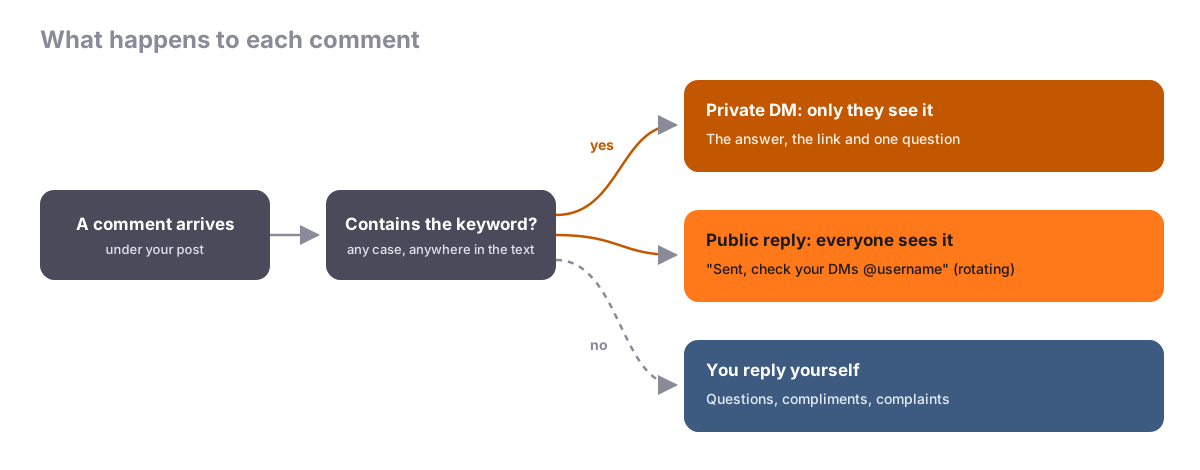
- One short line that points to the DM. The answer itself stays private.
- Rotate several versions so the thread does not read like a stamp.
- Real questions, compliments and complaints get a reply from you.
Two replies happen when someone comments
When a comment contains your keyword, the flow sends a private DM with what they asked for and, if you switch it on, posts a short public reply under their comment. Comments without the keyword get nothing automatic. They are yours to answer.
Three jobs the public reply does
It tells the person where to look. Plenty of people never notice a new message, especially when it lands in their message requests. "Sent, check your DMs" on their comment confirms it worked. Without it some people comment again, and some decide it was broken.
It proves the keyword works. A viewer scrolling the thread sees a dozen people wrote PRICE and each one got a quick reply. That answers the doubt "will I actually get something?" without you saying a word.
It shows somebody is home. A post full of unanswered comments looks abandoned. A post where comments get replies looks looked after, and that helps the next person decide to comment.
Good and weak public replies
Keep it to one line that points to the DM. Compare:
| Weak | Why it fails | Better |
|---|---|---|
| "The candle is $32!" | The answer is now public, the DM has nothing new | "Sent you the details, check your DMs" |
| "Thank you so much for your interest, we have sent you a direct message with all the information" | Nobody reads a paragraph in a comment | "In your inbox now" |
| "Check DMs" | Cold, and it sounds like a machine | "Just messaged you {{username}}" |
| The same line on every comment all week | The thread looks stamped | Four or five rotating versions |
The {{username}} variable tags the commenter by their handle, which makes a reply feel addressed to them. Instagram does not share commenters' names, so do not try to write "Thanks, Anna" into a template.
Why rotate several versions
If thirty comments in a row get the identical reply, the thread looks machine-made, because it is. Write four or five lines that mean the same thing and let them rotate. In Chat33 you can add up to 15 variants on a comment trigger, and one is picked at random for each comment.
Copy-paste reply sets
Use these as a starting point and match the emoji habits of your captions.
Coffee roaster, keyword BEANS:
- "Sent, check your DMs ☕"
- "The roast list is in your inbox"
- "Just messaged you
{{username}}" - "Done, enjoy the brew"
- "In your DMs now"
Interior designer, keyword GUIDE:
- "The guide is on its way to your DMs"
- "Sent, check your inbox"
- "Just messaged you
{{username}}" - "Done, let me know which room you start with"
Yoga studio, keyword SCHEDULE:
- "Schedule sent, check your DMs"
- "In your inbox
{{username}}" - "Just sent it, see you on the mat"
- "Check your messages"
Writing twenty of these by hand gets tedious. Using AI for keywords and DMs includes a prompt that produces a fresh set in seconds.
A full example: caption, DM and replies
A tattoo studio posts a finished fine-line piece.
- Caption, line one: "Fine-line flash day is next Saturday. Comment FLASH and I'll DM you the designs."
- Trigger: comment keyword
FLASH, on this post. - First DM: "Hey
{{first_name}}, here are all the flash designs and prices:https://yourstudio.com/flash. Want to grab a slot?" - Public reply variants: "Sent, check your DMs", "The designs are in your inbox
{{username}}", "Just messaged you". - A different comment in the thread: "Does fine line hold up on fingers?"
- Your own reply: "It fades faster there, so I usually suggest the wrist. Comment FLASH and I'll send this week's designs."
On Instagram comment DMs, {{first_name}} reads as "there", which is why the opener is "Hey". The last reply is the point: that comment was a real question, so it got a real answer, and the answer still ends with the keyword. Repeating the instruction like that teaches everyone reading the thread what to do.
Comments that need you, not a template
The automation handles keyword comments. Answer these yourself:
- Questions: "Does it come in black?" "Do you ship to Canada?"
- Regulars saying something kind: "Love this!" deserves "Thank you, so glad you like it", not "check your DMs".
- Complaints: always human. Often best moved privately: "I'm sorry, I've sent you a message so we can sort this out."
- Anything personal or emotional.
Matching looks for the keyword anywhere in a comment, ignoring case. If your keyword is a word unhappy people also use, such as ORDER or HELP, a complaint can get a cheerful "Sent, check your DMs". Choose a word that only appears in requests, and read the thread once a day.
Instagram comments and Facebook Page comments can both use this setup, and the DMs that follow land in one Chat33 inbox. On TikTok, YouTube and LinkedIn there is no DM automation, so every reply there is manual anyway, and a saved set of short lines still saves time.
Mistakes to avoid
- No public reply at all, so people do not know the DM arrived.
- One identical line under every comment.
- Answering the question publicly, leaving the DM with nothing to add.
- A keyword that also fires on complaints.
These sit alongside the setup errors in the most common DM automation mistakes. For picking the keyword itself, see comment keyword examples by industry, and for how the private part works, the comment-to-DM guide.
Comment-to-DM for Facebook PagesKeyword comments on your Page get a private DM and a rotating public reply, with the same flows you use on Instagram.
FAQ
Should the public reply contain the link?
No. Keep the link in the DM, where it is tracked and where the person can tap it later. A public reply with the answer or link gives people no reason to open the DM.
Can the public reply mention the person by name?
It can tag them by handle with {{username}}. Instagram does not share commenters' real names, so a name variable would not fill in there.
How many public reply variants do I need?
Four or five covers most posts. For a post that gets hundreds of comments, add more; Chat33 allows up to 15 per trigger.
Do I still need to read the comments if replies are automated?
Yes, once a day is enough for most accounts. Questions, compliments and complaints that do not contain the keyword get no automatic reply, and they are the comments people judge you by.