Get email leads from Instagram into Mailchimp, through the DMs
Instagram is good at getting attention and bad at keeping it. Someone loves your reel today, and next week the algorithm shows them somebody else. An email list does not have that problem. When you send a newsletter, it lands in the inbox of everyone who signed up, whether or not they saw your last post.
So the question most creators and small brands end up asking is simple: how do I turn the people who already react to my posts into people on my Mailchimp list?
This guide covers why asking in the DMs works better than a form behind a link, how the flow from a comment to a Mailchimp audience works, three setups you can copy, and what to send once someone is on your list.
In short:
- Ask for the email inside the DM, at the moment someone shows interest.
- Give a clear reason: a guide, a spot on a waitlist, a discount code.
- Send every email to Mailchimp automatically, with a tag such as
instagram. - Let a Mailchimp automation send the welcome email, so nobody waits for you.
Why the DM beats the link-in-bio form
The usual route to an email list on Instagram looks like this: "link in bio", a tap to your profile, a tap on a link page, a landing page, a form, a confirmation. Every step is a place to drop off, and each one happens after the person has already left the post that made them curious.
Asking in the DM keeps everything in one place. The person comments a keyword under the post they just watched, gets a message a few seconds later, and answers with their email in the same chat. No new page to load, no form fields on a phone keyboard, no remembering which link in your bio was the right one. Link in bio vs DM links compares the two paths in more detail.
There is a second benefit. A person who typed their email into a conversation with you knows why you have it. They asked for something and gave you an address to send it to. That is a better start for an email relationship than a box they ticked on a page they barely read.
How it works, step by step
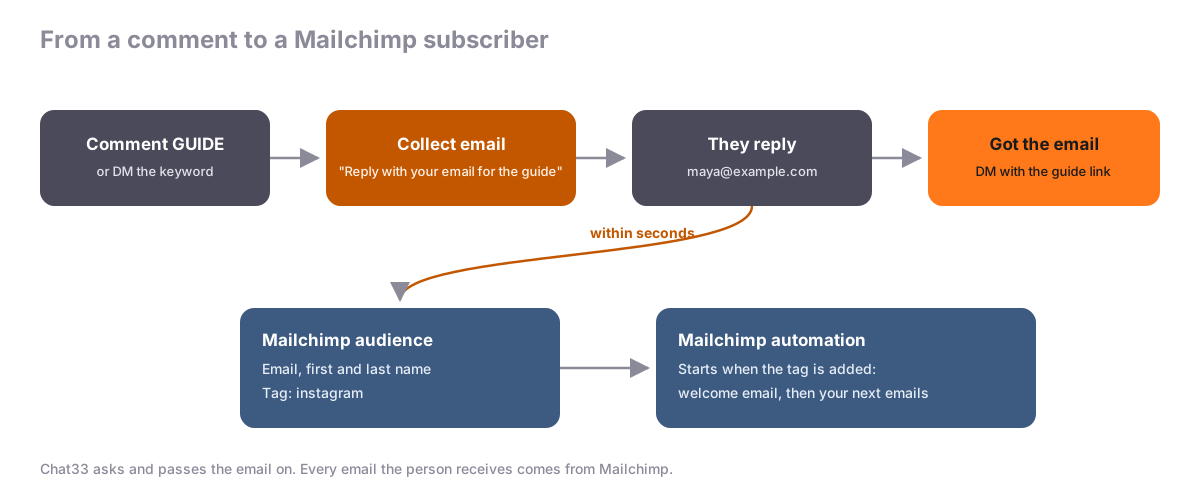
- A keyword starts the flow. Someone comments
GUIDEunder your post, or sends youGUIDEin a DM. On Facebook, a Messenger keyword works the same way. - Chat33 asks for the email. A Collect email step sends your question as a DM, for example "Want the guide? Reply with your email and I'll send it over."
- They reply with their address. The flow waits up to 24 hours for the answer. If they write something that is not an email, they get one gentle reminder, and never more than that.
- The flow goes on. On "Got the email" you send what you promised, such as the link to the guide. On "No answer" you can do nothing at all, which is often the polite choice.
- The email goes to Mailchimp. Within seconds, the person is added to the audience you picked, with their first and last name when Instagram or Facebook gives us a real name, and with the tags you chose.
Every email also stays in Chat33 under Contacts, Leads, with the flow, keyword and post it came from. The Mailchimp setup guide shows the connection step by step, with screenshots.
After a comment, Instagram allows one private reply until the person writes back. That is why the Collect email question has to be the first DM in a flow that starts from a comment: put the guide link after "Got the email", not before the question. Asking after a Facebook comment is not available yet; Facebook DM keywords work.
Three setups you can copy
A lead magnet
The classic: a free resource in exchange for an email.
Caption:   I put my 12 favorite beginner recipes in one PDF. Comment GUIDE and I'll send it.
Trigger:   Comment keyword "GUIDE"
Question:  Hey! Where should I send the recipe guide? Reply with your email address.
Got it:    Here you go: https://yoursite.com/recipes. I'll also email you a new recipe every Sunday.
Say in the question or the answer what else they will get from you. If they will receive a weekly email, tell them now. It costs you nothing and saves a lot of unsubscribes later.
A waitlist
For a course, a product drop or a new service. The email is how you reach everyone on launch day, which Instagram DMs cannot do for you: you can only message people who wrote to you recently. Course launch waitlist on Instagram covers the whole launch plan.
Caption:   Doors open next month. Comment EARLY to get on the waitlist and the early price.
Trigger:   Comment keyword "EARLY"
Question:  You're almost on the list. What's your email? You'll hear from me first when doors open.
Got it:    Done, you're on the waitlist. Is there one thing you'd want the course to cover?
The question in "Got it" is optional, but the answers make great research for the launch.
A discount code
For online stores. People who ask for a code are already thinking about buying.
Caption:   New collection is live. Comment CODE for 10% off your first order.
Trigger:   Comment keyword "CODE"
Question:  Want your code? Reply with your email and I'll send it right here.
Got it:    Your code is WELCOME10. Shop here: https://yourstore.com/new
Make sure your store's terms say whether the code is one per customer, and whether signing up means they get your marketing emails. If your audience needs proof of consent, turn on double opt-in in the Mailchimp connection: Mailchimp then emails each new person a confirmation link, and adds them only after they click it.
What to send next in Mailchimp
Getting the email is half the job. What makes it worth it is the first email they get from you.
Start a welcome automation from the tag. Mailchimp automations (Customer Journeys) can start when a tag is added to a contact. Set a tag such as instagram on the Mailchimp connection in Chat33, then build one journey in Mailchimp that starts when that tag is added. The person comments, replies with their email, and shortly after your welcome email is in their inbox. Which journey features you have depends on your Mailchimp plan.
Deliver what you promised, again. The DM already has the link, but put it in the first email too. DMs get buried; emails get searched.
Say who you are and what comes next. Two or three lines: what you write about, how often, and what the next email will be. This is the email that decides whether they open the second one.
Ask one question. "What made you grab the guide?" Replies tell you what your audience wants, and they also help your emails reach the inbox.
Then send your normal emails. Your Instagram leads are now part of the same list as everyone else. Use the tag to see how they behave compared with people who signed up on your website.
Tips that make a real difference
- Name the reward in the question. "Reply with your email" is a request. "Where should I send the guide?" is a favor you are doing them.
- One keyword per offer. If
GUIDEsends a recipe PDF on one post and a workout plan on another, nobody knows what they are signing up for, and neither do you. - Know how tags work. Tags are set on the connection, so every lead gets the same ones, whatever post they came from. If you run one big offer at a time, you can change the tag when the offer changes; it applies to leads from then on. Chat33's Contacts, Leads list shows the flow, keyword and post for every lead.
- Send the leads you already have. If you used Collect email before connecting Mailchimp, the card's Send existing leads button sends the older ones too. People already in the audience are updated, never added twice.
- Keep an eye on the card. It shows sent, waiting and failed counts. If the API key stops working, the card says Needs attention and the workspace owner gets an email. Leads wait in Chat33 until you fix it.
- Don't resubscribe people. If someone unsubscribed from your audience and comments again, Chat33 does not subscribe them again. They keep the status they have in Mailchimp.
If your leads are sales prospects rather than newsletter readers, a CRM is the better home. Collect Instagram leads in HubSpot covers that setup.
FAQ
Do I need a paid Chat33 plan?
No. The Collect email step and the Mailchimp integration are on every plan, including Free.
Does it work with Instagram DMs as well as comments?
Yes. A comment keyword or a DM keyword can start the flow on Instagram. On Facebook it works with Messenger keywords; asking after a Facebook comment is not available yet.
Will Chat33 email my leads?
No. Chat33 asks for the email in the DM and passes it to Mailchimp. Every email they get comes from your Mailchimp account.
What if someone types their email wrong?
If the reply has no email address in it, they get one reminder. If the address itself is wrong, Mailchimp may refuse it, and the delivery log in Chat33 shows that lead as failed. It never blocks the leads after it.
Can I use Mailchimp and a CRM at the same time?
Yes. A workspace can connect Mailchimp and HubSpot, and each new lead goes to both.
The short version
People react to your posts in the comments and the DMs. Ask for their email right there, give them a reason, and let Chat33 send every address to your Mailchimp audience with a tag. Then let a Mailchimp automation send the welcome email. See the plans or start with the Mailchimp setup guide.
Mailchimp integration in Chat33Every email your Instagram and Facebook DM flows collect, added to your Mailchimp audience within seconds, with tags and optional double opt-in.