Link in bio vs sending links in DMs
Instagram does not let you put clickable links in post captions. That single rule shaped a whole habit: "link in bio". It works, but it asks a lot of the viewer. Sending the link by DM is the alternative, and for many offers it converts better.
Here is how the two compare, and how to use them together.
The link in bio path
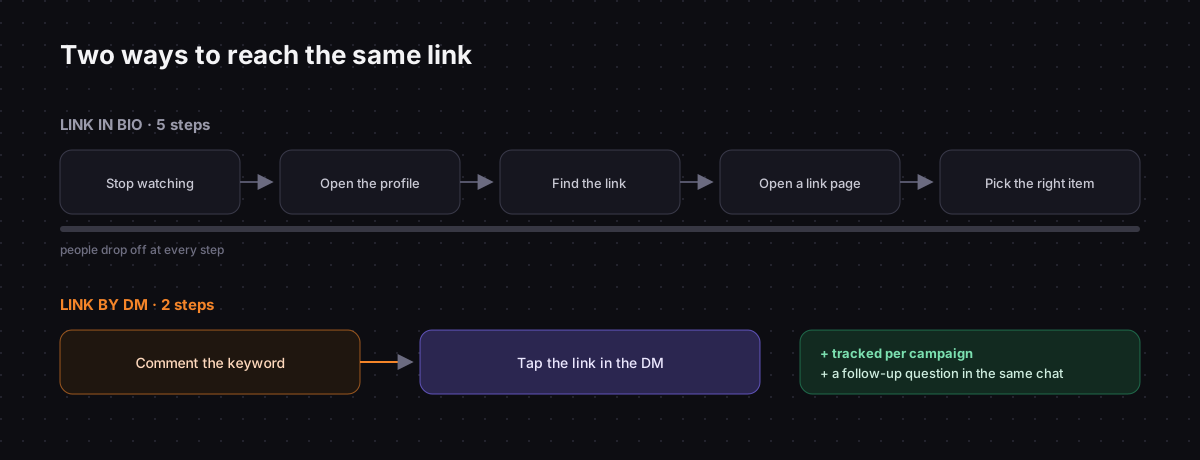
A viewer who wants your link has to:
- Stop watching.
- Tap your username to open the profile.
- Find the link, which may be one of several.
- Tap it, often landing on a link page with more choices.
- Pick the right item.
Each step loses people. By the time they get there, many have forgotten which post they came from. The link in bio also does not tell you which post sent the click unless you build extra tracking.
Where it works well:
- Evergreen destinations: your shop, your main signup page.
- People who already know you and go to your profile on purpose.
- Accounts that do not want to manage conversations.
Instagram allows several links in a bio, but more links mean more choices, and more choices mean fewer clicks on the one you care about.
The DM path
A viewer who wants your link comments or messages a keyword. Seconds later, the link is in their inbox.
- One action instead of five.
- The right link for that post, not a menu.
- It waits for them. The DM stays in their inbox until they are ready to open it.
- You can measure it per campaign, because each flow sends its own link and link clicks are tracked.
- It starts a conversation. You can ask a follow-up question, which you cannot do from a bio.
Where it works well:
- Post-specific offers: a guide, a product from this reel, a limited discount.
- Launches and waitlists, where you also want to know who is interested.
- Anything where a follow-up question adds value.
The trade-offs
DM links are not free:
- Someone has to set up the flow. A keyword, a message, the link. It takes minutes, but it is not zero. Setting up comment-to-DM on Instagram shows how.
- Platform rules apply. After a comment you get one plain-text private reply, so the link has to be in that first message. See the 24-hour messaging window.
- Keywords have to be chosen carefully, or the flow fires on unrelated messages. See choosing keywords.
Using both together
The strongest setup uses each for what it does best:
- Bio: one or two evergreen links. Your shop or site, and your main signup.
- Posts and stories: a keyword call to action for the specific offer ("Comment GUIDE").
- DM flow: the specific link, plus a one-word question that leads to your next offer.
- Default reply: mentions the bio link for everything else.
That way nobody hunts through a menu, and every campaign is measurable on its own.
Links to apps
If the destination is a mobile app, a plain link is awkward: iPhone users need the App Store, Android users need Google Play, and desktop users need a web page.
A Smart Link node in a Chat33 flow sends one link that detects the device and routes each person to the right place. Clicks are tracked like any other link in a flow. On the pricing page, smart links are listed from the Starter plan up.
What to measure
- Clicks per campaign from DM links, compared with profile link clicks for the same period.
- Keyword comments per post, which tell you how well the call to action lands.
- Conversions on your site from each source, using a marker on the destination URL such as
?utm_source=instagram&utm_medium=dm&utm_campaign=guide.
If DM links win for a type of offer, move that type out of the bio entirely.
Instagram DM automation in Chat33Comment-to-DM, keyword replies, tracked links and smart links for apps, on the official Instagram API.