How to get client approval on social media posts
Every agency that runs social media for clients has the same weekly ritual. Someone exports the posts into a document, sends it to the client, waits, chases, gets three replies from three different people, copies the changes back into the scheduler, and hopes the version that goes live is the one that was approved.
It works until a post goes out with last week's caption, or a client says "I never saw that one."
This guide is about replacing that ritual with a workflow: a fixed path every post takes from draft to published, with a clear record of who approved what. The first part works with any tool. The second part shows how to set it up in Chat33.
In short:
- Use one to three steps: an internal review first, then the client.
- Name one decision maker per step on the client side. More reviewers, not more approvers.
- Send posts in batches, early, with a deadline tied to the first post's time.
- A change request must say what to change. A comment is not optional.
- If a post is edited after approval, it needs approval again. If only the time moves, it doesn't.
Why email and WhatsApp approvals break
Approval over email or chat is not a workflow, it is a conversation. That is fine for one post. It falls apart at twenty posts a week across five clients, for a few predictable reasons.
The client approves a copy, not the post. A screenshot or a document is a snapshot. The moment someone fixes a typo in the scheduler, what goes live is no longer what the client saw, and nobody knows it.
Feedback is scattered. One comment by email, another in a chat group, a third on a call. Someone has to merge them, and that's where mistakes happen.
There is no "no". Silence is ambiguous. Did the client approve, or did they not open it? Teams end up publishing on silence and apologizing later.
Nothing stops a post that wasn't approved. The scheduler doesn't know about the email thread. If a post is queued, it goes out, approved or not.
A real approval workflow fixes these by keeping the approval attached to the post itself, and by refusing to publish anything that hasn't been approved.
Design the workflow: one to three steps
Most agencies need two steps. Some need one, a few need three. More than three slows everything down without catching more mistakes.
One step (client only). For small accounts where the writer is also the account lead.
Two steps (review, then approval). The most common setup. An account lead or editor on your team checks the posts first: spelling, links, brand voice, the right media on the right channel. Only then does the client see them.
Three steps (review, client, legal or brand). For regulated industries or large brands where a second person on the client side has to sign off: compliance, legal, a regional manager.
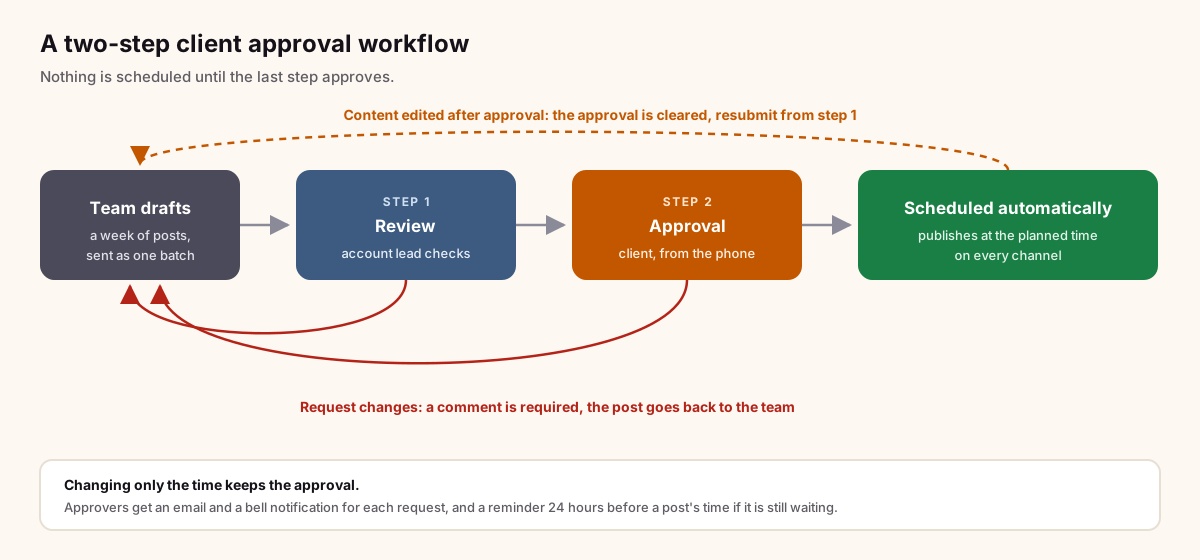
Each step should advance only when the step before it approves. Step 2 never sees a post that step 1 rejected.
Who should approve
The hardest part of client approval is rarely the tool. It's agreeing on who decides.
One decision maker per step on the client side. If the marketing manager and the founder both have to approve, you have two steps, not one step with two people. If either of them can approve, that's one step with two approvers, and the first one to decide settles it.
Write it into the kickoff doc. "Posts are approved by Ana. If Ana is out, Marco approves."
Reviewers who comment are not the same as approvers who decide. It's fine for five people at the client to look at the posts and leave comments. Only the named approver presses the button.
Your team approves the internal step, not the client's. If a client approves something by phone, record that it happened and how, rather than pretending they clicked.
Deadlines and reminders
Approvals that arrive late are almost as bad as approvals that never arrive. A few habits help:
- Send in batches, not one post at a time. A client who gets one request a week for seven posts will answer. A client who gets seven requests will answer some of them.
- Send early. A good rule is at least two working days before the first post in the batch. For campaigns with paid media or launches, a week.
- Tie the deadline to the post's time, not to the request. "Approve by Thursday" means nothing if the first post goes out Wednesday. The real deadline is the scheduled time of each post.
- Remind once, close to the deadline. One reminder the day before is useful. Daily chasing is noise, and clients learn to ignore it.
- Decide what happens when time runs out. Either the post waits (the safe default) or it's moved. It should never publish just because nobody said no.
Handle change requests with comments
"Can we change this?" is not a change request. A change request should say what to change, on the post itself, where your team will see it.
- Require a comment with every "request changes". A rejection without a reason costs a round trip.
- Keep the conversation on the post. One thread per post, with the client's comments, your replies and the history of what changed between versions.
- Keep internal notes internal. Your team needs to say things like "client asked for this last month too" without the client reading it. Use notes that only the team can see.
- Resubmit, don't re-send. When the change is made, the same post goes back into the workflow, and the client sees the new version with the conversation still attached.
When a post is edited after approval
This is where most approval processes leak. The client approves on Monday, someone tweaks the caption on Tuesday, and Wednesday's post is something nobody approved.
The rule that works:
- If the content changes (text, media, adding a channel), the approval is cleared. The post has to go through the workflow again. Your client approved words and pictures, not a post ID.
- If only the time changes, the approval stands. Moving a post from 9:00 to 11:00 doesn't change what the client agreed to.
A tool should enforce this for you, not people's memory.
How to set it up in Chat33
Chat33 has client approvals built into every client workspace. If you manage several brands, each one gets its own workspace with its own channels, posts, team and approval settings, all under one agency login and one bill. Agency workspaces explains how that part works. Approvals are on paid plans; see the plans.
1. Open Settings, Approvals
Switch to the client's workspace in the sidebar, then open Settings and go to Client approvals. Settings are per workspace, so each client can have their own setup.
2. Pick the mode
- Off. Posts are scheduled without approval.
- Optional. Your team can send posts for approval when it makes sense, and schedule others directly.
- Required. No post is scheduled or published without a current approval. This is what most client accounts should use.
Turning on Required doesn't touch posts already scheduled; Chat33 tells you how many there are before you confirm.
3. Add your steps
Start with one step, or add up to three. Name them so everyone understands them: "Review" and "Approval" are the defaults. Step 2 is asked only after step 1 approves, and any one approver on a step decides for that step.
4. Choose the approvers
For each step, pick the approvers. They can be owners, admins or members of your team, or clients. Viewers can't approve.
5. Invite the client as a reviewer
Under the step where the client decides, use Add approver by email, and enter their name and email. They join the workspace as a client: they review and approve the posts sent to them, take no seat on your plan, and see nothing else in the workspace.
If you want every approver to sign in before deciding, switch on Approvers must sign in. Otherwise the client can open the email, press one button and review, with no password. That link only gives access to this workspace and expires.
6. Send a batch
Write the posts in the composer as drafts. You can use a different caption per account, so the LinkedIn version and the Instagram version don't have to match. Select the posts and press Request approval, add an optional message, and send. The approvers get one email and a bell notification for the whole batch.
7. The client approves from their phone
The client opens the email and lands on a mobile-friendly page with a preview of each post as it will look on each channel. For every post they can Approve or Request changes (a comment is required), or press Approve all when the batch is fine.
When the last step approves, the posts are scheduled automatically at the time you set. If a post is still waiting 24 hours before its time, the approvers and the requester get a reminder. If the client approves after a post's time has passed, it's marked approved late, and you pick a new time or publish it now.
8. Work the changes in the thread
Each post has its own conversation: the client's comments, your replies, internal notes the client never sees, @mentions, edit history, and the approval history inline. Comment emails arrive as a digest, so the client isn't flooded.
If you edit the text or media after approval, the post shows "Edited after approval" and needs to be resubmitted. Moving only the time keeps the approval. In a workspace where approval is required, Chat33 won't publish anything that isn't approved, whatever happens in between.
If the client approves another way, for example on a call, you can Mark as approved with a note on how they approved. That note stays in the history.
AI agents and the API can draft posts and send them for approval, but only a person can approve. An agent can prepare a week of posts; your client still decides.
FAQ
Does the client need a Chat33 account?
They need to be invited to the workspace, which happens when you add them as an approver by email. They don't need a password unless you turn on "Approvers must sign in". A client takes no seat on your plan.
Can the client see our other clients or internal notes?
No. A client sees only the posts sent to them in that workspace. Internal notes are never shown to them.
What if two people at the client both need to approve?
Make them two steps. Two approvers on the same step means either one can decide.
Which channels does it work for?
Every channel Chat33 publishes to, including Instagram, Facebook, TikTok, YouTube, X, LinkedIn, Threads and Bluesky. The client sees a preview per channel.
The short version
Keep the approval on the post, not in an inbox. Use a review step on your side and one decision maker on the client's, send in batches with the post's time as the deadline, require a comment for every change request, and treat any content edit as a new version that needs approval. Chat33 does the enforcing: set up client approvals in the client's workspace and send your next batch.
Schedule Instagram posts with Chat33Plan posts, Reels and carousels for each client's Instagram, send them for approval, and let them publish on time once the client says yes.