Threads automation: auto reply to replies and schedule Threads posts
Threads moves fast. A post can pick up dozens of replies in an hour, people tag you in conversations you never saw, and the replies that ask for a link get buried under the ones that just say "this." If you post there regularly, answering everything by hand turns into a second job.
Chat33 now works on Threads through Meta's official Threads API, approved in Meta App Review in October 2026. This guide covers what you can automate on Threads, what you can't, three flows you can copy, and how to set them up.
In short:
- Auto reply to replies on your Threads posts, or to mentions of your account anywhere on Threads, with an optional keyword.
- The answer is a public Threads reply. Threads has no DMs in its API, so automation answers in the open.
- Hide spam and scam replies automatically.
- Schedule Threads posts in the same calendar as your other channels, and read per-post insights.
What you can automate on Threads
Here is everything Chat33 does on Threads today.
Publishing. From the calendar, the API or an AI agent over MCP you can post text (up to 500 characters, where an emoji counts as 4 or more, and at most 5 links), JPEG and PNG images, video, mixed carousels and polls. You can add a topic tag, choose who can reply, attach a link, and optionally share the post to the linked Instagram Story automatically.
Replies. Read, answer and hide replies inside Chat33, next to your other channels.
Automation flows. Two triggers:
- Someone replies on Threads: a reply to one of your Threads posts.
- Someone mentions you on Threads: a mention of your account anywhere on Threads.
Each one takes an optional keyword. Leave it empty and the flow runs on every reply or mention. The actions are a public Threads reply or hiding the reply, plus the usual flow steps: tag, webhook, delay, condition and A/B split.
Insights. Views, likes, replies, reposts, quotes and shares for each post.
What you can't automate on Threads
Being clear about this saves you time:
- No DMs. The Threads API has no messaging, so there is no comment-to-DM on Threads. Every automated answer is a public reply. If you want private DMs from a keyword, that is what Instagram comment-to-DM is for.
- No deleting posts on Threads from Chat33. Deleting a post in Chat33 removes Chat33's record only. The post stays on Threads, and you delete it in the Threads app.
- No keyword search or social listening. Chat33 sees replies to your posts and mentions of your account, not every Threads post that contains a word.
- No follower triggers. A new follower does not start a flow.
- Not instant. Chat33 checks Threads every 5 minutes, so new replies and mentions are picked up within minutes, not the second they land.
One more detail: reply flows watch your newest 15 posts from the last 7 days. Run a keyword campaign on a fresh post, not one from last month.
Chat33 for ThreadsSchedule Threads posts with the rest of your calendar, answer and hide replies in one place, and auto reply to replies and mentions with keyword flows.
How a Threads auto reply works
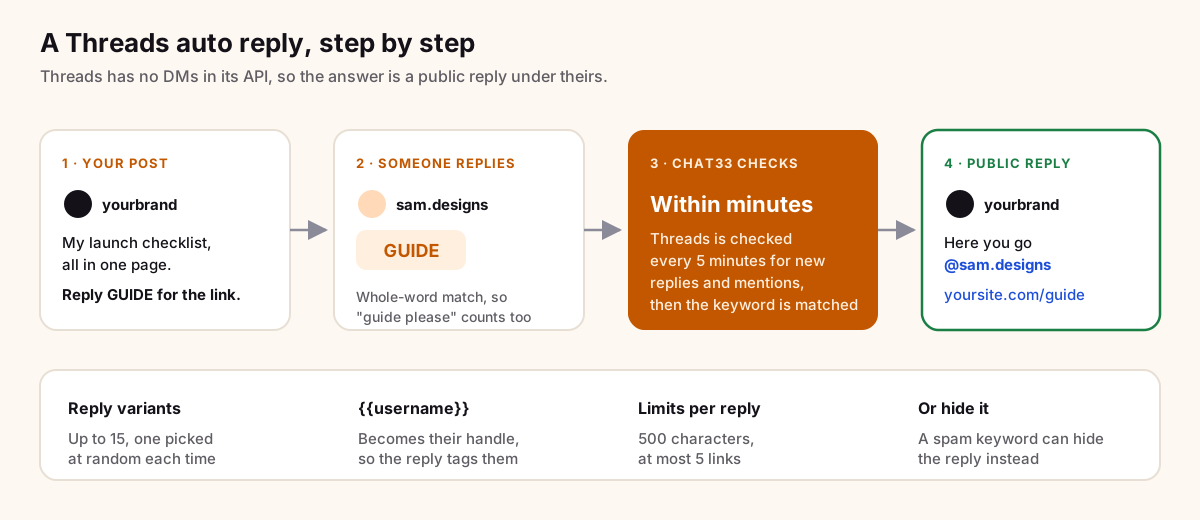
- You post on Threads and ask for a keyword: "Reply GUIDE and I'll send you the link."
- Someone replies
GUIDE. - Within minutes, Chat33 picks up the reply and checks it against your flow's keyword.
- Chat33 posts a public reply under theirs, tags them with
{{username}}and includes the link.
Keywords match as whole words, so GUIDE matches "guide please" but not "guidelines."
Three Threads flows you can copy
1. Reply GUIDE to get the link
The Threads version of a lead magnet. Since the answer is public, the link is visible to everyone who reads the thread, which is fine for a free guide, a template or a signup page.
Post:      I wrote down the exact checklist I use before every launch. Reply GUIDE and I'll drop the link.
Trigger:   Someone replies on Threads, keyword "GUIDE"
Reply 1:   Here you go @{{username}}: https://yoursite.com/guide
Reply 2:   @{{username}} sent! The checklist is here: https://yoursite.com/guide
Reply 3:   Thanks for asking @{{username}}, this is the one: https://yoursite.com/guide
Then:      Tag "threads-guide"
The tag lets you count how many people asked, next to the post's insights.
2. Thank everyone who mentions you
When someone tags you in a post or a conversation, a short thank-you shows you are paying attention. Use the mention trigger with no keyword.
Trigger:   Someone mentions you on Threads, no keyword
Reply 1:   Thanks for the mention @{{username}}!
Reply 2:   Appreciate you @{{username}} 🙏
Reply 3:   @{{username}} thank you, made our day.
Keep these short and link-free. A thank-you with a sales link reads like an ad. If you want to know who is mentioning you, add a webhook step to send each mention to Slack or a spreadsheet tool, and answer the interesting ones yourself.
3. Hide spam and scam replies
Popular posts attract the same scam replies: "message me on WhatsApp," "I made money with this investment," fake support accounts. A hide flow keeps them out of sight for your readers.
Trigger:   Someone replies on Threads, keyword "whatsapp"
Action:    Hide the reply
Make one flow per word you keep seeing, for example whatsapp, telegram or investment. Pick words your real audience doesn't use; if you sell investment courses, "investment" is the wrong keyword. Check the flow's activity now and then, so a real reply that got hidden by mistake doesn't go unnoticed.
Write public auto replies that don't look like a bot
A DM is seen by one person. A public reply is seen by everyone who opens the thread, so ten identical replies in a row look like spam to people, and can look that way to the platform too. A few habits help.
Write several variants. Chat33 takes up to 15 reply variants and picks one at random each time. Put a blank line between them. Three to five are enough for most posts; use more on a post you expect to blow up.
Tag the person. {{username}} becomes their handle, so each reply is clearly addressed to someone. It also notifies them, which matters because they won't get a DM.
Put the link at the end. Lead with a few human words, then the link. "Here you go @sam: link" reads better than a bare URL.
Stay inside the limits. Each reply can be up to 500 characters with at most 5 links. In practice, one link and one or two sentences works best.
Match the voice of your post. If your posts are casual, the replies should be too. If people can tell which replies are automatic, the variants are too formal. Public comment reply has more on writing replies that are seen by everyone, and comment keyword examples by industry has keywords you can adapt for Threads.
Cross-post Threads to your Instagram Story
When you schedule a Threads post, you can turn on the automatic share to the Instagram Story of the linked Instagram account. That way your Instagram followers see the Threads post too, without you making a separate Story.
It suits posts that ask for a reply, like a GUIDE post: your Instagram audience sees it in Stories, taps through and replies on Threads, where the flow answers them. For Instagram itself, you can run a parallel post with a comment keyword that sends a private DM; see Instagram auto reply for the options there.
Schedule Threads with the rest of your calendar
Threads posts live in the same calendar as Instagram, Facebook, TikTok, YouTube, X, LinkedIn and Bluesky. A few ways to use that:
- Write once, adjust per channel. Pick Threads next to your other channels in the post editor and shorten the text where needed. Threads text is capped at 500 characters.
- Use the reply control. For an announcement, you can choose who can reply. For a GUIDE post, leave replies open, or the flow has nothing to answer.
- Add a topic tag. Threads allows one topic per post, so pick the one your audience actually follows.
- Plan polls and carousels ahead. Both can be scheduled like any other post.
When a reply flow is tied to a scheduled post, publish the post first, then select it in the flow. Until the post exists on Threads, there is nothing to watch.
Measure what works with Threads insights
Each Threads post in Chat33 shows views, likes, replies, reposts, quotes and shares. For a keyword post, compare replies with the number of people tagged by the flow: if a post has lots of replies but few keyword replies, the ask in the post wasn't clear enough. If views are high and replies are low, the offer wasn't interesting enough. Change one thing per post (the hook, the keyword, the offer) so you know which change did it.
Set it up in Chat33, step by step
- Connect Threads. Go to Channels and connect Threads. You log in with your Threads account and approve the permissions. Access lasts 60 days and renews automatically.
- Create a flow. Go to Flows and create a new flow.
- Pick the trigger. Choose "Someone replies on Threads" for replies to your posts, or "Someone mentions you on Threads" for mentions.
- Set the keyword. Type
GUIDE, or leave it empty to answer every reply or mention. - Choose posts (reply flows). Leave it on all posts, or select specific recent posts from your newest 15 in the last 7 days.
- Add the action. Add "Reply on Threads" and write your variants with a blank line between each, using
{{username}}to tag the person. Or add the hide action for a spam flow. - Add extras if you need them. A tag to count leads, a webhook to send them elsewhere, a delay, a condition or an A/B split to test two versions of the reply.
- Switch the flow on and test it: reply with the keyword from another account and wait a few minutes.
Threads counts as one channel. The Free plan includes 1 channel, and the pricing page lists what each paid plan adds.
Let an AI agent do it over MCP
Chat33 has an MCP server, so Claude, ChatGPT, Cursor or Codex can work on your account directly: draft and schedule Threads posts, and build these flows. The MCP page shows how to connect each one.
An example prompt:
Write three Threads posts for next week about our launch checklist, each under 400 characters,
each ending with "Reply GUIDE and I'll send you the link." Schedule them for Tuesday, Wednesday
and Thursday at 9am. Then create a flow on my Threads account: when someone replies with GUIDE,
post a public reply that tags them with {{username}} and links to https://yoursite.com/guide.
Write five reply variants so they don't repeat. Don't switch the flow on yet, I want to check it first.
Read what the agent made before switching anything on. A public reply goes out under your name.
FAQ
Can Chat33 send DMs on Threads?
No. The Threads API has no messaging, so all Threads automation answers in public. For private DMs from a keyword, use Instagram or Facebook.
How fast does the auto reply go out?
Within minutes. Chat33 checks Threads for new replies and mentions every 5 minutes.
Is Threads automation allowed?
Chat33 uses Meta's official Threads API, approved in Meta App Review. Keep replies varied and relevant, as you would on any platform. Is Instagram DM automation safe? covers the same thinking for Instagram.
Can I delete a Threads post from Chat33?
Not yet. Deleting in Chat33 removes the post from Chat33 only. Delete it on Threads in the Threads app.
Can I auto reply to posts that mention a keyword but don't tag me?
No. Chat33 watches replies to your own posts and mentions of your account. It does not search Threads for keywords.
Does Threads count against my channel limit?
Yes, as one channel. The Free plan includes 1 channel.
The short version
On Threads, automation means public replies: answer people who reply with a keyword, thank people who mention you, hide the spam, and schedule your posts alongside every other channel. Write varied replies that tag the person, keep the link short and at the end, and check insights to see which posts get people talking. Connect Threads and build your first flow.
Threads in Chat33Publish text, images, video, carousels and polls, auto reply to replies and mentions, hide spam, and read every post's insights.