WordPress auto post + comment to DMHit Publish.
It's on every network.
Every article you publish goes to Facebook, Instagram, LinkedIn, X and Bluesky, written to fit each one. Readers who comment LINK on Instagram or Facebook get the article in their DMs.
- Free on WordPress.org
- Free Chat33 plan, no card
- Block and classic editor
Chat33
Accounts
Comment to DM
keyword LINK
Draft
FB · IG · LI · X · BSKY
1 DM · 1 click
You wrote it once.
Then comes the second job: sharing it everywhere. And on Instagram, a link in the caption can't even be tapped.
Sharing by hand
Every article, every time
- 1Open five apps and paste the link five times
- 2Rewrite it short enough for X
- 3Find an image Instagram accepts
- 4Watch the link die in the Instagram caption
The first thing skipped on a busy day
With the Chat33 plugin
One click, five networks
- 1Click Publish
- 2Every network gets its own post, and readers get the link by DM
Shared in the background, the editor never waits
The link reaches Instagram readers by DM
One article. Five posts.
Each one written to fit, none of them by you.
Title, excerpt and link, written for each network: X counts to 280 the way X does, Bluesky to 300, LinkedIn to 3,000.
Your own words when you want them: a social caption for every network, plus an optional text just for X with a live counter.
The featured image goes with it, converted to a JPEG Instagram accepts. No image? The editor tells you before Instagram is skipped.
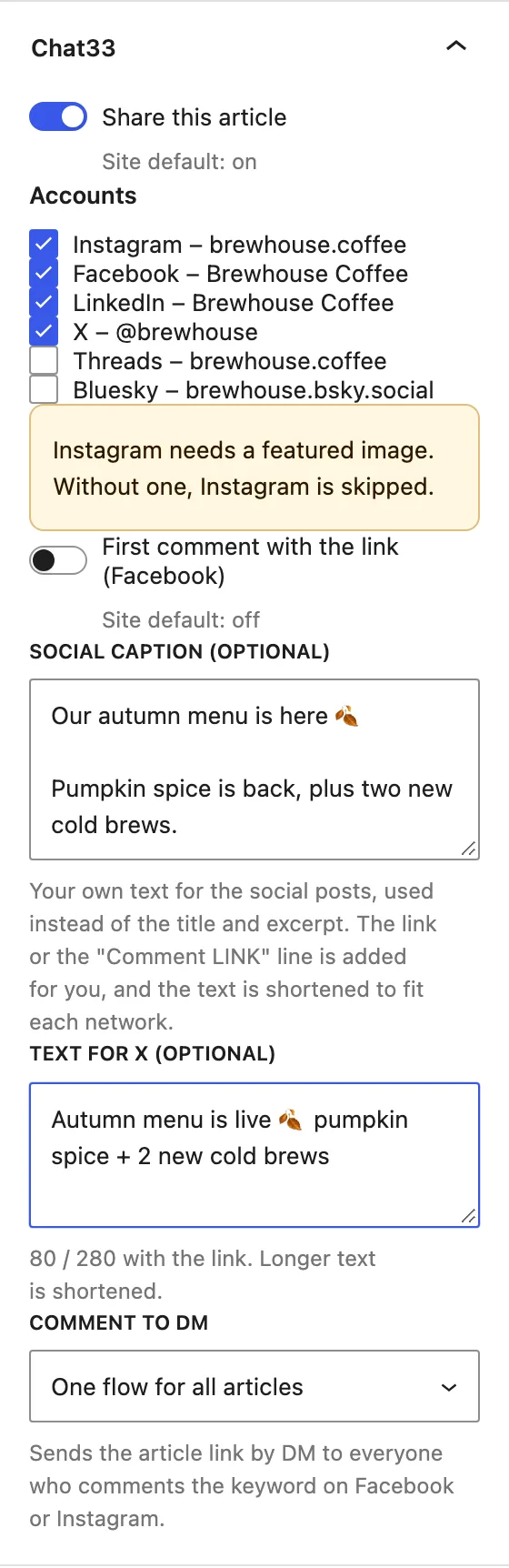

The link, delivered.
Where a caption link can't reach, a DM can.
Comment LINK, get the article. The Instagram and Facebook posts ask for one word, and the link arrives in the reader's DMs.
Or the link in the first comment, posted by your Facebook Page the moment the post is live, so the post itself stays link-free.
Every DM and click counted, and shown back in WordPress next to the article that earned it.
Live in 3 steps.
A few minutes, then every article shares itself.
Install the plugin
Plugins → Add New, search for Chat33, click Install. Free from WordPress.org.
Connect Chat33
Paste your Chat33 API key under Settings → Chat33 and tick the accounts your articles should go to.
Publish as usual
That's it. Every new article goes out in the background, and the results come back to WordPress.
The results, inside WordPress.
No new dashboard to check. It's all next to your articles.
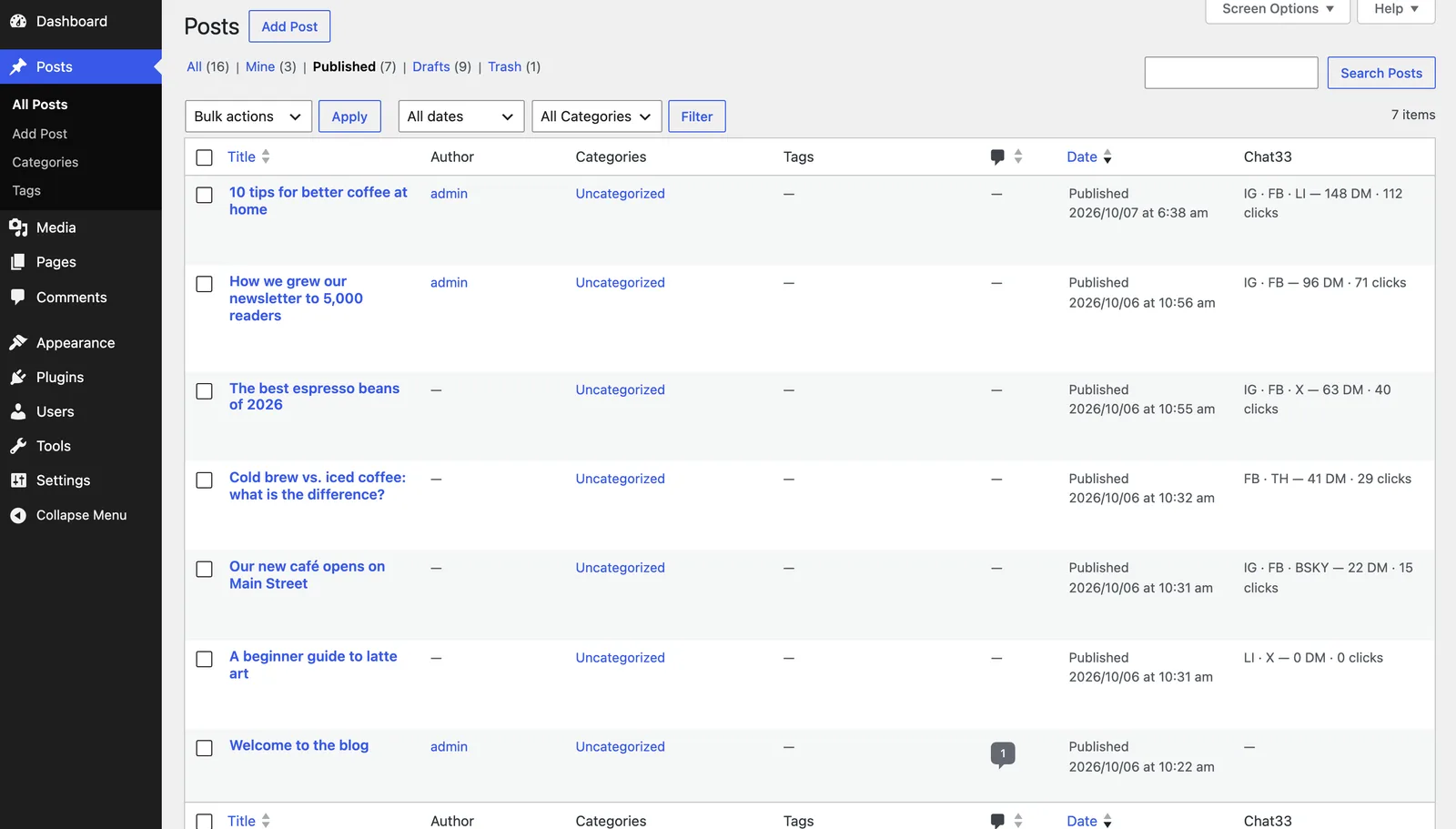
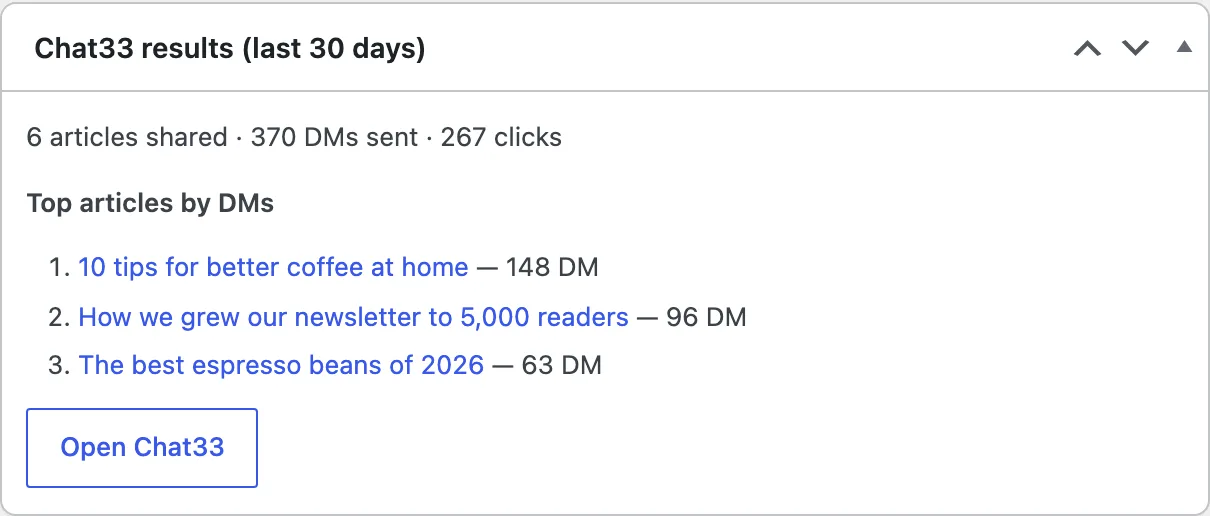
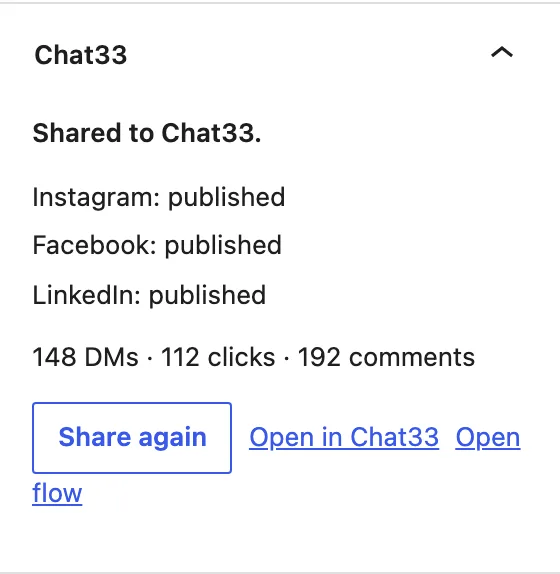
Real plugin, demo site, sample numbers.
Built for how WordPress works.
Shared once, never twice
Only the first publish shares. Saving or updating an article never posts it again.
Scheduled posts too
A scheduled article goes out to the networks when WordPress publishes it.
Share again, with a reason
If a network refuses a post, the editor shows why and a button to share it again.
Duplicates start clean
Copied an article with a duplicate plugin? The copy is shared as a new article, not skipped.
Block and classic editor
The Chat33 box sits in the block editor sidebar and in the classic editor, with the same options.
Results in three places
In the editor, as a column in the Posts list, and in a dashboard widget for the last 30 days.
The plugin is free.
It runs on a Chat33 account, and that starts free too.
Free
$0/mo
No credit card, no time limit
- 1 connected account
- 3 flows (one covers all your articles)
- 100 active contacts a month
- 1 user
Starter
$19/mo
Billed monthly, cancel anytime
- 10 connected accounts
- Unlimited flows
- 1,000 active contacts a month
- 2 team members
Pro
$49/mo
Billed monthly, cancel anytime
- 20 connected accounts
- Unlimited flows
- 5,000 active contacts a month
- 5 team members
Questions
- Is the WordPress plugin free?
- Yes, the plugin is free on WordPress.org. It needs a Chat33 account: the Free plan includes 3 flows and 1 connected account, and the default setup (one comment-to-DM flow for all your articles) runs on it. Starter ($19 a month) has unlimited flows and up to 10 accounts.
- Which networks does it post to?
- Facebook Pages, Instagram, LinkedIn, X and Bluesky. Threads is rolling out. You pick the default accounts once in Settings → Chat33 and can change them on any article.
- How long are the posts? Can I write a different text per network?
- Each network gets its own post that fits its limit: X 280 (a link counts as 23), Bluesky 300, Threads 500, Instagram 2,200, LinkedIn 3,000. Too long? The excerpt is shortened first, then the title; the link and the comment line are never cut. Write a social caption to use your own text instead, and an optional separate text for X with a live 280 counter.
- How does comment to DM work with my articles?
- The Instagram and Facebook posts ask readers to comment a keyword, LINK by default. Everyone who comments it gets the article link in their DMs, automatically. It works on Instagram and Facebook only, because those are the networks that allow a private reply to a comment.
- Can the link go in the first comment on Facebook?
- Yes. Turn on the Facebook first comment and your Page posts the article link as the first comment as soon as the post is live, so the post itself has no outbound link. Clicks on that link are counted.
- Why does Instagram need a featured image?
- Instagram only accepts posts with an image, so the plugin uses the article's featured image, converted to an Instagram-safe JPEG. An article without one is skipped for Instagram and the editor tells you why.
- Does it work with scheduled posts and updates?
- A scheduled article is shared when WordPress publishes it. Each article is shared once, on its first publish, so saving or updating it never posts it twice. A Share again button is there when you want to repeat it.
- Does it work with the classic editor?
- Yes. The Chat33 box appears in the block editor sidebar and as a meta box in the classic editor, with the same options in both.
Write the article.
We'll share it.
Install the free plugin, connect a free Chat33 account and publish your next article.
- Free on WordPress.org
- Free Chat33 plan, no card
- Block and classic editor