DM automation for creators: lead magnets, links and freebies

Once an account starts growing, the inbox changes. It stops being a place for conversations and becomes a queue: people asking for the link you mentioned, the preset from last week's reel, the discount code, the collab email. Answering all of it by hand eats the time you need for making things.
DM automation gives that time back, and it does something a link in bio cannot: it starts a one-to-one conversation with every person who raised their hand.
Five things creators automate
1. Freebie delivery
The most common setup. A reel or carousel ends with "Comment GUIDE and I'll DM it to you." A comment keyword flow sends the link.
Instagram allows one plain-text message in response to a comment, so the link goes in that first message (the comment-to-DM guide explains why). Ask for a reply at the end, and anyone who answers opens a normal conversation where you can send more.
Here's the guide:
https://yoursite.com/guideReply MORE if you want the advanced version too.
2. Email list growth
A freebie behind an email signup turns followers into subscribers you own, which matters for a creator whose reach depends on an algorithm. Point the DM link at a landing page with your signup form, and deliver the file by email.
Links in flow messages are tracked, so you can see how many people clicked from each campaign and compare that to signups on your side.
3. Product and course launches
Before a launch, stories and posts ask people to reply to a story or comment WAITLIST. The flow confirms they are on the list and tags them waitlist-course-name.
A tag is useful even if you never message those people again through Instagram: it tells you how much demand there was, and which posts produced it.
Instagram only delivers automated messages within 24 hours of the person's last message. You cannot automatically message your whole waitlist on launch day. Use the DM to send a link to your email signup, and announce the launch there.
4. Brand and collab inquiries
Brands and agencies message creators every day, mixed in with fans. A collab keyword, mentioned in your bio, gets them a message with your media kit link and a short form. The Webhook node can send the inquiry, including what they typed, to a spreadsheet tool or CRM so it does not get lost in the inbox.
5. Affiliate and gear links
"What camera is that?" is a question you can answer once. A gear keyword sends your kit list. If the links are affiliate links, say so in the message; disclosure rules apply in DMs too.
A flow worth copying: the freebie with a follow-up
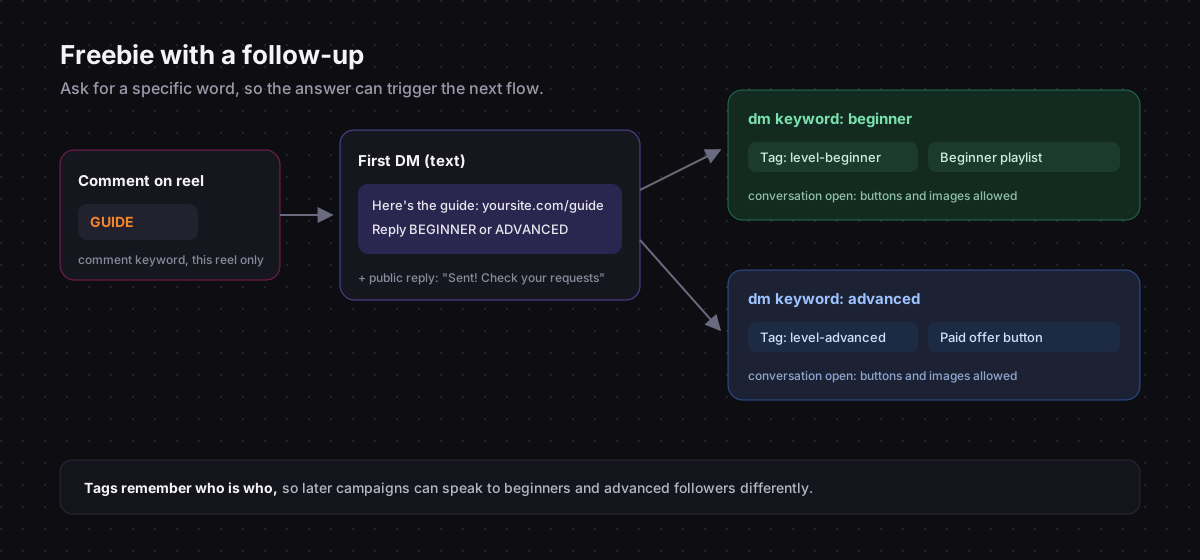
- Trigger: comment keyword
GUIDE, limited to the reel that asks for it. - Send Message: the link, plus "Reply BEGINNER or ADVANCED and I'll send you the next step."
- Reply to Comment: "Sent! Check your message requests if you don't follow me."
- Second flow, dm keyword
beginner: taglevel-beginner, send your beginner playlist. - Third flow, dm keyword
advanced: taglevel-advanced, send your advanced resource or paid offer.
People who answer tell you who they are, and the tag keeps that information for later. Asking for a specific word, instead of an open question, is what lets a keyword trigger understand the answer.
Features that matter more as you grow
- A/B split on paid plans: test two versions of the first message and keep the one that gets more clicks.
- Smart links on paid plans: one link that sends iPhone users to the App Store, Android users to Google Play, and everyone else to the web.
- Team members: when an assistant or manager helps with the inbox, they get their own login instead of your password.
- Multiple accounts: if you run more than one Instagram account, connect them all and manage their automations and inboxes from one place.
Keep it human
Automation is for the repeat questions. The messages that matter most, from a fan who had a hard week or a brand with a real offer, deserve a real answer. A good setup sends the freebie in seconds and leaves you more time to reply properly to those.
A few habits help:
- Tell people it is an automated message, and that you read replies. The automation rules cover the rest.
- Vary your public comment replies when a post takes off.
- Retire campaign keywords when the campaign ends.
- Read the inbox daily, even when the automation is doing most of the work.
Comment-to-DM, keyword replies, link tracking and team access, built on the official Instagram API.