Send DM leads to your CRM with webhooks
A lead that only exists in an Instagram inbox is a lead that gets forgotten. The person asked for a quote, applied for a collab or joined a waitlist, and a week later nobody remembers who it was.
Webhooks fix that. A webhook is a message your automation sends to another system the moment something happens. Put one in a DM flow and every lead lands where your team already works: a CRM, a spreadsheet, a helpdesk or your own database.
The two nodes
Chat33 flows have two nodes for talking to other systems.
Webhook sends a POST request with a JSON description of what just happened to a URL you choose. It is the simple option, made for receiving tools.
HTTP Request calls a URL with the method you choose: GET, POST, PUT or DELETE. With POST and PUT it includes the same details in the body. Every request carries the flow and contact IDs as headers, X-Flow-Id and X-Contact-Id. Use it when you are calling your own API.
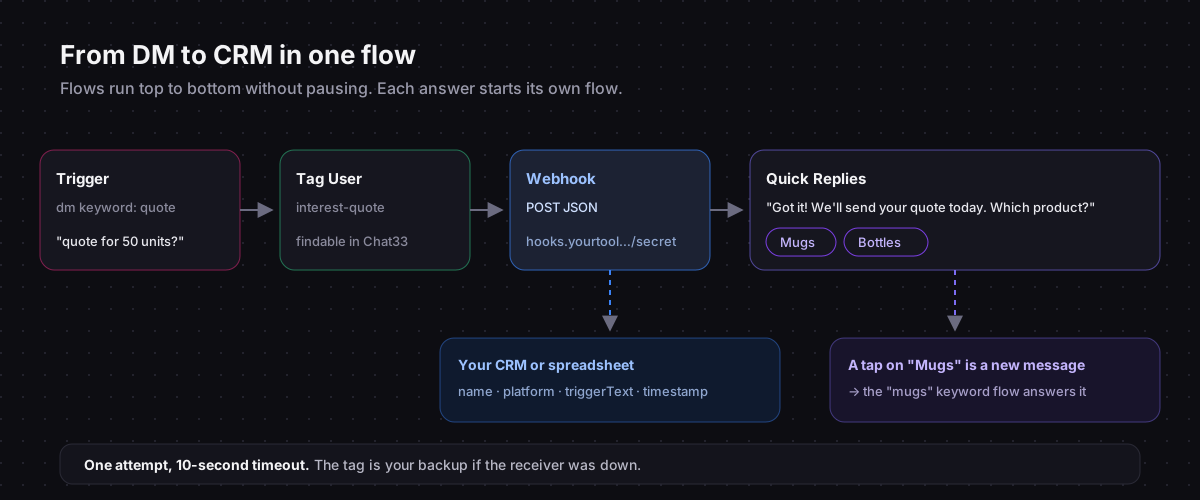
Both are one-way: they send data out, and the flow carries on without using the response. Flows also run straight through from top to bottom; they do not stop to wait for the person's next message. A question you ask in a flow is answered by another flow, triggered by the reply.
What the webhook sends
A Webhook node sends a body like this:
{
  "event": "flow_webhook",
  "flowId": "flow_123",
  "contactId": "contact_456",
  "recipientId": "1784...",
  "platform": "instagram",
  "triggerText": "Hi, I'd like a quote for 50 units",
  "triggerType": "dm_keyword",
  "keyword": "QUOTE",
  "postId": null,
  "commentId": null,
  "contact": {
    "name": "Anna",
    "externalId": "1784...",
    "platform": "instagram"
  },
  "timestamp": "2026-04-04T10:15:00.000Z"
}
The most useful field is usually triggerText: the message or comment that started the flow, in the person's own words. keyword is the trigger keyword that matched, and for a comment, postId and commentId say which post it came from.
What it does not include: email addresses or phone numbers. Instagram does not share them with apps, so if your CRM needs contact details, ask for them in the conversation or send a link to a form.
If the detail you need is an email address, a Collect email step asks for it in the DM, and Chat33 can send every address it collects straight to HubSpot or Mailchimp, no webhook needed. Collect Instagram leads in HubSpot shows that setup.
Where to send it
Anything that can receive an HTTPS request works:
- An automation platform's incoming webhook. Most offer a "catch webhook" trigger that gives you a URL. From there, add a row to a spreadsheet, create a CRM contact or post to a team chat.
- Your CRM's inbound webhook, if it has one.
- Your own backend, through the HTTP Request node.
If you would rather call Instagram from your own code instead, the Instagram DM API guide shows what that takes.
Setting it up
- Get the receiving URL from the tool that will accept the data.
- Add a Webhook node to the flow that runs once the lead has told you something useful, for example the
quotekeyword flow that answers a tap on "Get a quote". - Paste the URL.
- Activate the flow and trigger it from a second Instagram account.
- Check the receiving tool for the test request, then map the fields you need.
Securing the endpoint
The webhook request is not signed, so treat the URL itself as the secret:
- Use a long, random URL or include a secret token in the query string that your receiver checks.
- Accept only the fields you expect and ignore everything else.
- Check that
flowIdmatches one of your flows before acting on the data. - Use HTTPS.
Reliability
Each node makes one attempt with a 10-second timeout. If the receiving side is down at that moment, that event is not delivered again.
For most lead capture that is fine, because the conversation is still in your Chat33 inbox and the contact is still tagged. For anything critical, have the receiver respond fast (store first, process later), and pair the webhook with a Tag User node so you can always find the leads in Chat33 if something was missed. Our tagging guide has a naming scheme that works well for this.
Lead flows worth building
- Quote requests:
quotekeyword, tag and webhook, then a quick-reply question whose options each trigger their own flow (and their own webhook, if the answer matters to your CRM). - Collab inquiries:
collabkeyword, media kit link, webhook to the sheet your manager reads. See DM automation for creators. - Waitlists: story reply keyword, a confirmation, a tag, and a webhook so the count updates in real time.
- Wholesale: a Condition node that checks whether the message contains "wholesale", and sends only those leads to your B2B pipeline.
Webhooks, HTTP requests and the rest of the ways Chat33 connects to the tools you already use.